
Understanding NIS2 is one thing. But implementing it in real systems - without slowing down development or breaking user experience - is where devs need real help.
Because NIS2 doesn’t just tell you what you should do.
Instead, it implicitly asks you:
-
How do you enforce access across distributed systems?
-
How do you monitor identity activity in real time?
-
How do you secure APIs, integrations, and automated workflows?
And most importantly - how do you do all of this at scale?
This is where many teams hit a wall.
Not because they don’t understand the requirements, but because translating them into architecture decisions isn’t straightforward.
In this blog, we are going to break that down for you. So, let’s get started!
Translating NIS2 Into Technical Requirements
NIS2 outlines what needs to be achieved. But for engineering teams, the real question is: what does this look like in code and systems?
Here’s a simplified mapping:
| NIS2 Requirement | What It Means Technically |
|---|---|
| Access Control | Role-Based Access Control (RBAC), Attribute-Based Access Control (ABAC) |
| Strong Authentication | MFA, Passwordless (Passkeys), Adaptive Auth |
| Monitoring & Logging | Audit logs, event tracking, SIEM integration |
| Incident Response | Real-time alerts, automated workflows |
| Supply Chain Security | API authentication, scoped tokens, secure integrations |
If you read it closely, you will realise every requirement somewhere gets connected to one layer - Identity and access management.
Designing The Core Architecture for NIS2 Compliance
To meet these requirements, most modern applications need to rethink their architecture - not just patch existing systems.
A typical NIS2-aligned architecture includes the following layers:
1. Identity and Access Control Layer
This is your control plane.
It handles:
-
User identity lifecycle (registration, updates, deletion)
-
Authentication flows
-
Access policies
And this is where you need a specialized IAM platform the most. Without a centralized IAM layer, enforcing consistent policies across systems becomes nearly impossible.
2. Authentication Layer
This is where trust is established.
You need to move beyond passwords and implement:
-
Multi-factor authentication (MFA)
-
Passwordless authentication (passkeys, OTPs, magic links)
-
Adaptive authentication (based on device, location, behavior)
The goal is simple:
👉 Make it harder for attackers to impersonate users—without making it harder for users to log in.
3. Authorization Layer
Authentication answers who is logging in. Authorization answers what they can do after they log in.
For NIS2, this means:
-
Implementing fine-grained access control
-
Implementing role-based or attribute-based permissions
-
Context-aware decision making
For example:
-
A user logging in from a trusted device may get full access
-
The same user from a new location may get restricted access
If the risk score is higher than usual, which means a lot of “new’s” are involved - like new location + new IP + new device - the users has to pass through an additional layer of security check - preferably involving biometric auth or passkeys.
4. Monitoring & Audit Layer
NIS2 requires:
-
Visibility into user activity
-
Traceability of actions
-
Fast detection of anomalies
Technically, this means:
-
Logging authentication events
-
Tracking access patterns
-
Integrating with monitoring tools or SIEM systems
Because if you can’t see what’s happening, you can’t respond to it. And this is the layer where most systems fall short.
5. API & Integration Security Layer
Modern applications are API-first.
Which means:
-
APIs need authentication
-
Tokens need to be scoped
-
Access needs to be time-bound
Instead of static API keys, you should use:
-
OAuth-based token systems
-
Short-lived access tokens
-
Delegated access mechanisms
This becomes even more critical when dealing with:
-
Third-party integrations
-
Microservices
-
Automated workflows
Before vs After: What NIS2 Looks Like in Real Systems
Let’s take a typical modern SaaS application.
It has:
-
User authentication
-
Multiple APIs
-
Third-party integrations
-
Admin dashboards
-
Possibly AI-driven workflows or automation
On paper, it might already have “security controls” in place.
But when you look closer, the gaps become obvious. Let’s take a look at the before vs after scenario for this system to see how NIS2 changes things in reality.
| Area | 🚫 Before: Fragmented, Reactive Security | ✅ After: Identity-Centric, NIS2-Aligned Architecture |
|---|---|---|
| Authentication | Basic email + password, MFA optional or inconsistently enforced | MFA enforced for sensitive actions, Passwordless options (passkeys, OTPs), Adaptive authentication based on risk |
| Access Control | Roles defined in code across services, Over-permissioned users, No centralized policy enforcement | Centralized roles and permissions, Least-privilege access enforced consistently, Context-aware authorization |
| API & Integrations | Static API keys, Shared credentials across services, Overexposed integrations | Token-based authentication (OAuth), Short-lived, scoped tokens, Controlled third-party access |
| Monitoring & Visibility | Logs stored but rarely monitored, Limited visibility into user or API activity | Real-time activity tracking, Audit logs for all actions, Alerts for suspicious behavior |
| Incident Response | Delayed detection, Manual access revocation, No clear audit trail | Real-time detection and alerts, Instant access revocation, Complete traceability of actions |
| Session & Credential Control | Long-lived sessions, No centralized revocation, Credentials rarely rotated | Centralized session management, Instant session termination, Automated credential/token rotation |
| Non-Human Identities | Shared credentials for services, No clear identity for automation or agents | Dedicated identities for APIs, services, AI agents, Scoped and monitored access, No shared secrets |
Where Most Implementations Break Down
Even with the right architecture in mind, many teams struggle with execution.
Common gaps include:
-
MFA is implemented - but not enforced consistently
-
Audit logs exist - but aren’t monitored in real time
-
Tokens are issued - but never rotated
-
Access policies are defined - but not centralized
-
APIs are secured - but over-permissioned
And increasingly:
👉 Non-human identities are ignored
AI agents, services, and automated workflows often:
-
Share credentials
-
Operate with excessive permissions
-
Lack clear identity boundaries
Which creates a blind spot in otherwise “compliant” systems.
How LoginRadius Helps You Implement NIS2 (Step-by-Step)
With LoginRadius, you can configure most of these requirements directly from the console - without writing custom logic for each layer.
Let’s walk through how you can go from a fragmented setup to an NIS2-aligned architecture.
Step 1: Enforce Strong Authentication (MFA & Passwordless)
Start with the most critical layer - authentication.
After signing up with LoginRadius, login to your admin console.
In your LoginRadius Admin Console:
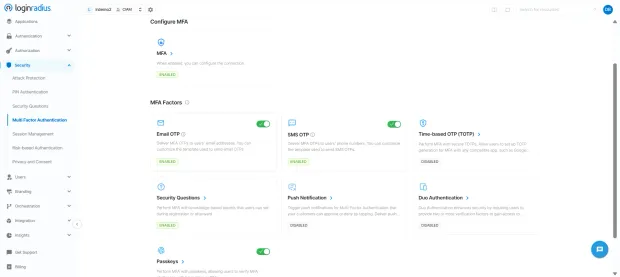
-
Go to Security → Multi-Factor Authentication (MFA)
-
Enable MFA for your application
-
Choose the factors you want to support (Email OTP, SMS, Push Notification, etc.)
-
Set enforcement rules (e.g., mandatory for all users or specific roles)
Next, to reduce reliance on passwords:
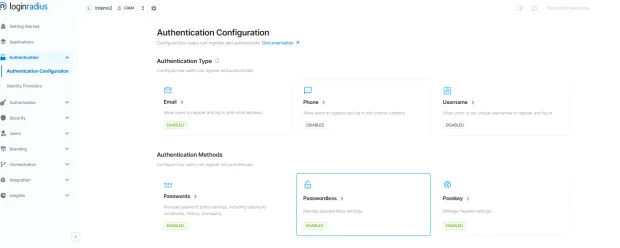
-
Navigate to Authentication → Passwordless (under authentication methods)
-
Enable options like passwordless phone (sms), email, magic links, or smart login
-
Configure and customize the email or sms to be sent to the customer
👉 This ensures every login is verified with strong, modern authentication methods - aligned with NIS2 expectations.
Step 2: Centralize Roles and Access Control
Now move to controlling what users can do after login.
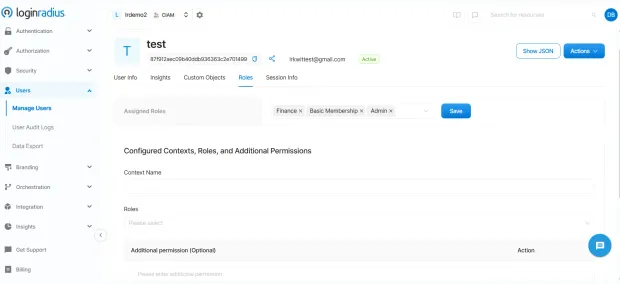
In the Admin Console:
-
Go to **Users. Manage Users **section will open. Click on the “Roles” tab.
-
Assigned roles will appear. Click “Add” to assign new roles and permissions to the user based on least-privilege principles.
👉 This removes hardcoded access logic and gives you a centralized policy layer across applications.
Step 3: Secure APIs
To secure your APIs with LoginRadius, you can implement several authentication and authorization mechanisms, one of the primary ones being OAuth based security in case you build an OAuth based app.
OAuth 2.0 Token-Based Security
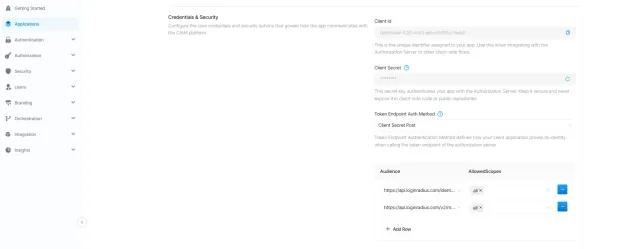
Use OAuth 2.0 access tokens to protect your API endpoints.
-
After configuring an OAuth 2.0 app in the Admin Console, clients obtain access tokens that authorize requests to protected resources.
-
You can set Token Expiration (default 3600 seconds) and Refresh Token TTL (default 86400 seconds) to control token validity periods.
-
For single-page apps where the Client Secret cannot remain confidential, whitelist JavaScript web origins in the CORS Origin field.
Step 4: Enable Monitoring, Logging, and Alerts
Visibility is critical for NIS2 compliance. And this is where LoginRadius excels.
In the Admin Console:
-
Go to Insights. From there, you can navigate to user analytics and platform analytics
-
User Analytics provides insights into user growth, demographics, and login behavior
-
Identity Analytics: This section focuses on user growth and demographics with detailed charts and reports. You can access Total Customer Accounts, Total Customer Profiles, Blocked Profiles, Deleted Profiles, New Customer Accounts, Age Group distribution, Browser Distribution, Device Usage, Region, Gender breakdowns, and more.
-
Login Analytics: This section provides an overview of user login behavior, including Login distribution, daily and monthly active users (DAU/MAU), and user return dates.
-
-
Platform Analytics provides complete visibility into API performance and usage. You can track real-time traffic, latency, errors, with breakdown for IPs, hosts, endpoints, methods, status codes, and user agents.
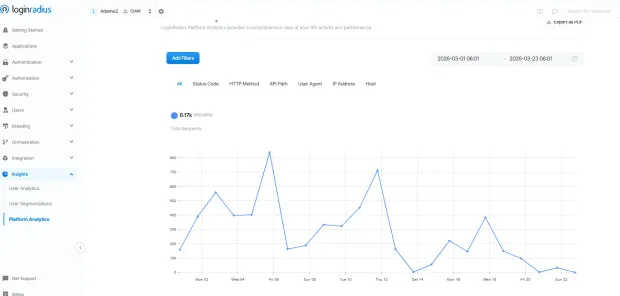
And you get all of that pre-integrated into your admin console.
Step 5: Control Sessions and Respond to Incidents
When a risk is detected, response speed matters.
In LoginRadius admin console:
-
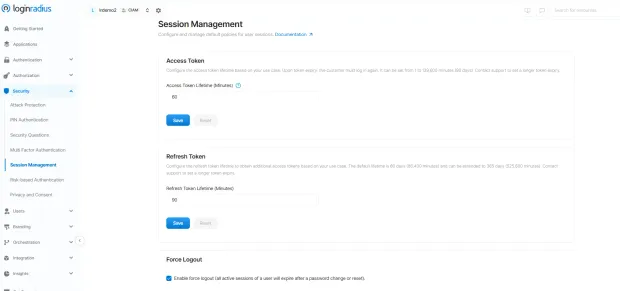
Go to Session Management
-
Configure session expiration policies
-
Enable global session revocation capabilities
For compromised accounts:
-
Revoke active sessions instantly
-
Rotate tokens or credentials
-
Force re-authentication where required
👉 This helps you contain incidents quickly and maintain control over access.
Step 6: Manage Non-Human Identities (AI Agents)
This is where most systems fall behind - but it is becoming increasingly critical.
With LoginRadius you can:
-
Create separate verifiable identities for AI Agents
-
Assign scoped, time-bound access tokens
-
Monitor how these identities interact with your systems
👉 Instead of shared credentials, every non-human entity gets a defined identity and controlled access.
What This Looks Like in Practice
By following these steps, you’re not just “adding security features.”
You’re building a system where:
-
Authentication is enforced consistently
-
Access is centrally controlled
-
Activity is fully visible
-
And every entity—human or machine—is governed by identity
Which is exactly what NIS2 is pushing organizations toward.
To Sum Up
NIS2 isn’t asking you to add more security tools. It’s asking you to rethink how security works across your system.
From authentication to APIs to monitoring - everything comes down to one question: Who is accessing your system, and what are they allowed to do?
The challenge isn’t understanding this. It’s implementing it in a way that’s consistent, scalable, and doesn’t slow your team down.
That’s where platforms like LoginRadius make a real difference—by turning identity into a single, enforceable control layer across your entire architecture.
Want to see how you can move from fragmented security to an identity-first model? Explore LoginRadius or book a demo


