Introduction
Remember when having a password alone felt secure enough? Those days are long gone. Today, hackers don’t need to break in—they trick you using phishing, data leaks, and brute-force attacks. The sheer volume of these attacks are proof enough that passwords alone can’t carry the load anymore.
That’s why most modern apps now add something extra, multi-factor authentication (MFA). One of the most popular tools in that toolbox is the one-time password (OTP). It is likely that you’ve used OTPs without even knowing. Those short codes you receive by text or email to verify your identity. But the effectiveness of all OTPs are not the same.
And when it comes to OTPs, the most secure and reliable form is TOTP, or time-based one-time password. Instead of sending data over the network, it’s generated on your device using a shared secret and the current time. Think of this shared secret as a unique, secret key/code known only by your device and the website or app.
If you’ve ever opened an app like Google Authenticator and typed in a 6-digit code that disappears after 30 seconds, you’ve used TOTP. It keeps your logins safer by making sure that even if someone steals your password, they still can’t get in.
So what makes TOTP so trusted in cybersecurity? Why are developers using it across finance, SaaS, healthcare, you name it?
And how can you start using it in your own application? Let’s walk through how TOTP authentication works, and how it improves on traditional OTPs. Finally, this blog will show how easy it is for you to set it up using LoginRadius.
What is TOTP (Time-based One-time Password)?
A time-based one-time password (TOTP) is a temporary numeric code used to verify a user’s identity during login. The code changes every 30 seconds, ensuring it’s valid for only a short time.
TOTP uses two inputs: a shared secret key (known only to the server and the user’s authenticator app) and the current timestamp. Because this algorithm is time-driven, it produces a new code at regular intervals. As a result, each passcode is short-lived, making it far more secure than static passwords or long-lasting OTPs.
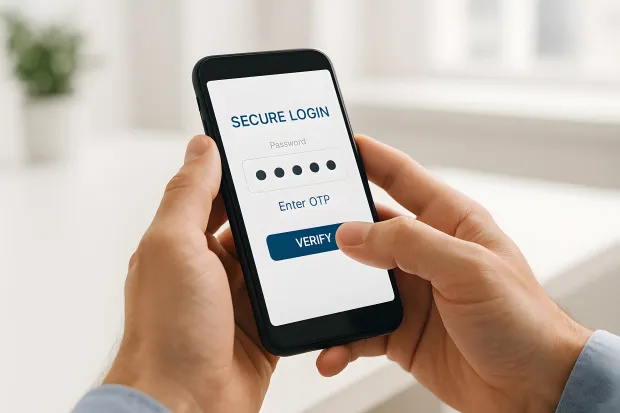
This method is especially effective against phishing, credential stuffing, and brute-force attacks. Even if a TOTP code is intercepted, it becomes useless within seconds.
So, what is TOTP in cybersecurity? It’s a lightweight but powerful authentication mechanism that acts as a second layer of defense, especially in multi-factor authentication (MFA) setups. With TOTP authentication, users don’t need to rely on SMS or email-based codes. These delivery methods are often vulnerable to interception, SIM swapping, and message delays.
Instead, TOTP codes are generated locally on the user’s device using apps like Google Authenticator, Microsoft Authenticator, LoginRadius Authenticator, or Authy. Since these apps work offline, time-based one-time passwords offer better reliability and privacy compared to network-dependent alternatives.
Moreover, TOTP is built on an open standard called RFC 6238 and is widely supported by modern authentication platforms and security frameworks. It’s often compared to HOTP (HMAC-based One-Time Password), which generates codes based on a counter. For real-time login experiences, TOTP offers better usability and security, making it the de facto standard.
LoginRadius makes it easy to integrate TOTP into any identity and access management (IAM) strategy. With built-in support for TOTP MFA codes, developers can protect user sessions with minimal friction while meeting security and compliance requirements across industries.
How Time-Based One-Time Passwords Work?
The TOTP algorithm generates short-lived numeric passcodes by combining
-
a shared secret key (usually generated during user onboarding)
-
Along with the current timestamp, broken into fixed intervals, typically 30 seconds.
TOTP is formally defined in the RFC 6238 standard, which specifies how time-based one-time passwords are generated using a shared secret and a time-step counter.
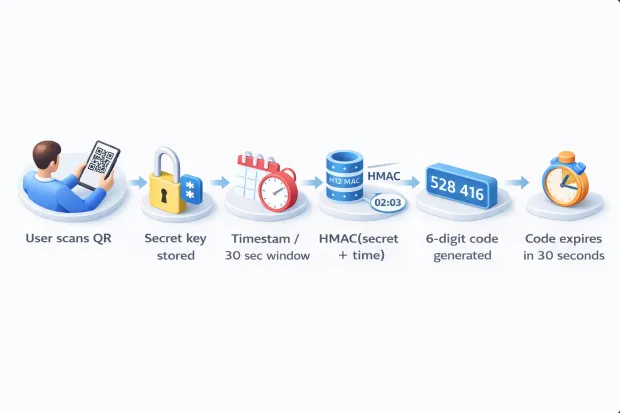
Both the client (i.e., the user’s authenticator app) and the server store this same secret key, and both use the same algorithm and clock to generate the code at login time.
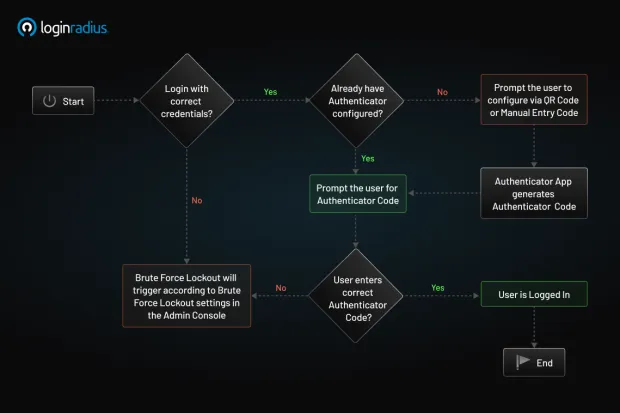
Here’s a simplified breakdown of how time-based one-time passwords are generated:
-
Time Step Calculation:
The current Unix time (in seconds) is divided into a 30-second interval to get a time step (e.g., T = floor(current_time / 30)).
-
HMAC Hashing:
This time, step T is then combined with the secret key using HMAC (Hash-based Message Authentication Code), often using the SHA-1 hashing algorithm. The result is a secure hash.
-
Dynamic Truncation:
A subset of the hash output is selected using dynamic truncation, producing a binary string.
-
Modulus Operation:
That binary value is then converted to a 6-digit (or sometimes 8-digit) number using a modulus operation, typically % 10^6 for a 6-digit passcode.
This process happens on the client and server side alone and no codes are transmitted, which is a key reason why TOTP authentication is resilient against man-in-the-middle, phishing, and SIM swap attacks.
Because both the server and the authenticator app calculate the code using the same time window and logic, they arrive at the same code without any communication between them. If the code entered by the user matches what the server expects, authentication succeeds.
Time-Based OTP (TOTP) in LoginRadius allows users to receive one-time passcodes through an authenticator app installed on their mobile device. This provides a secure second factor of authentication after the initial login. Supported authenticator apps include Google Authenticator, Microsoft Authenticator, and LoginRadius Authenticator.
How to Enable TOTP
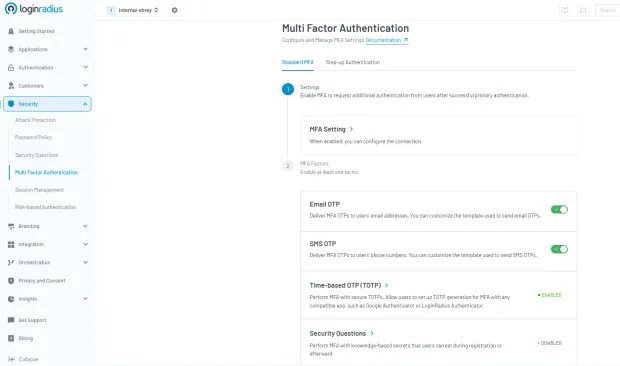
Here’s a step-by-step guide to quickly enable TOTP authentication through LoginRadius CIAM.
-
Navigate to Multi-Factor Authentication in the LoginRadius Admin Console
-
Toggle on TOTP
-
Configure:
- Issuer ID (name shown in authenticator app)
- QR code dimensions
When implementing TOTP authentication, the system will provide:
-
A QR code for users to scan
-
A manual entry code as a backup
After successful first-factor authentication, users will receive a response containing:
{
"SecondFactorAuthentication": {
"QRCode": http://chart.googleapis.com/chart?cht=XXXXXXXXXXXXX,
"ManualEntryCode": "XXXXXXXXXXXXXXXXXXXX",
"IsAuthenticatorVerified": false
}
}
This allows secure authentication while providing flexibility through multiple supported authenticator apps.
Why You Should Use TOTP Authentication
As cybersecurity threats grow in frequency and complexity, organizations are under constant pressure to adopt authentication methods that are both secure and scalable. Time-based one-time passwords (TOTP) have emerged as a resilient second factor, delivering robust protection against unauthorized access while remaining user-friendly and easy to implement.
Here are some of the advantages of TOTP authentication, which makes a trusted standard in modern identity security:
1. Time-Limited Codes
Every TOTP MFA code is generated with a short lifespan, typically 30 seconds. This tight time window significantly reduces the opportunity for attackers to reuse or intercept valid codes. Even if a malicious actor manages to view or capture the code, it will expire before it can be exploited.
2. Device-Based Generation
Unlike SMS or email-based OTPs, time-based one-time passwords are generated entirely on the user’s device using an app like Google Authenticator, Microsoft Authenticator, or Authy. No data is transmitted over the network, which removes attack surfaces such as SIM swapping, man-in-the-middle interception, or compromised mailboxes. This local generation approach enhances both privacy and reliability.
3. Offline Functionality
One of TOTP’s greatest advantages is that it works without an internet connection. Since codes are calculated using a shared secret and the current timestamp, no network communication is required during authentication.
This is ideal for remote employees, mobile users, or field workers operating in low-connectivity regions. Offline support also ensures that authentication remains fast and uninterrupted even during outages.
4. Compliance Alignment
For industries under regulatory pressure, such as finance, healthcare, and government, TOTP provides a standards-based solution that supports compliance with global security frameworks. It aligns with requirements from:
Implementing TOTP authentication demonstrates due diligence and a strong security posture in audit scenarios.
5. User Trust and Experience
TOTP strikes the right balance between strong security and user convenience. Authenticator apps are widely used, free to install, and require no additional hardware. The process is simple: open the app, grab the code, and log in.
When implemented through platforms like LoginRadius, TOTP becomes even more seamless, integrating directly into your existing identity flows using prebuilt APIs and SDKs. Users benefit from enhanced account protection without additional complexity or friction.
TOTP authentication is not just an enhancement, but it’s a critical component of enterprise-grade multi-factor authentication. Whether you're protecting customer accounts, internal systems, or third-party portals, time-based one-time passwords offer a scalable, secure, and user-approved solution for modern access control.
Weaknesses of Time-Based One-Time Passwords
While TOTP authentication is a strong and widely adopted security measure, it isn’t without its limitations. Developers, IT teams, and security architects should be aware of the trade-offs to design resilient systems that support both security and usability.
1. Device Dependency
TOTP MFA codes are generated locally on the user’s device using an authenticator app such as Google Authenticator or Authy. If a user loses that device, uninstalls the app, or forgets to back up the TOTP secret during setup, they’ll likely be locked out of their account. Unlike cloud-synced solutions, there’s no centralized recovery unless a backup mechanism is in place.
2. No Built-in Sync or Recovery
Most time-based one-time password apps don’t support cross-device sync or cloud-based backup by default. Users who upgrade devices or reset their phones must manually reconfigure their authenticator, which often requires access to the original secret key or QR code. Without proper re-enrollment flows, recovery becomes painful, both for users and support teams.
3. Time Sensitivity and Clock Drift
TOTP relies on tight time synchronization between the client and the server. Even minor discrepancies can result in invalid codes. While most systems introduce a small tolerance window (+30 seconds), highly desynchronized environments may still lead to failed logins and increased support overhead.
4. User Experience Gaps Compared to Push or Passkeys
Compared to passkeys or push-notification MFA methods, TOTP authentication requires more manual effort, launching a separate app, copying a code, and pasting it during login. It also lacks session-level visibility and control, such as the ability to deny a login request in real-time, which more modern approaches like FIDO2 or biometric MFA can offer.
According to NIST SP 800-63B guidelines, TOTP-based authentication is considered a valid MFA method but is not fully phishing-resistant, especially against real-time man-in-the-middle attacks.
TOTP vs Passkeys vs Push MFA
| Feature | TOTP | Passkeys | Push MFA | SMS OTP |
|---|---|---|---|---|
| Phishing Resistance | Moderate | High | Moderate | Low |
| Offline Support | Yes | Yes | No | No |
| User Experience | Medium | Excellent | Good | Poor |
| Setup Complexity | Medium | Medium | Low | Low |
| Security Level | High | Very High | High | Low |
Balance Security with Backup and Onboarding
Despite these limitations, TOTP MFA codes remain a secure, standards-based choice, especially for offline-capable, compliance-sensitive environments. To mitigate the downsides:
-
Offer backup MFA options (SMS, biometrics, recovery codes)
-
Encourage secret key export or QR code re-scan during device migration
-
Implement time sync tolerances and NTP enforcement
-
Educate users on best practices for storing recovery information
So, Is TOTP Still Worth It?
Absolutely. Even with these challenges, TOTP MFA codes offer serious protection without requiring internet access or mobile networks. They’re fast, secure, and widely supported. But to make the most of them, you’ll want to:
-
Offer clear setup instructions
-
Encourage backup code storage
-
Provide recovery options
-
Use smart time-tolerance settings
With the right support and a little user education, time-based one-time passwords can be one of the most effective ways to keep accounts secure, without making users jump through too many hoops.
Key Takeaways
TOTP (Time-Based One-Time Password) generates short-lived authentication codes based on time and a shared secret.
- It uses HMAC-based cryptography combined with a time step (typically 30 seconds)
- Unlike HOTP, TOTP is time-based rather than counter-based
- TOTP works offline and is widely used in MFA systems
- It is secure but not fully phishing-resistant
- Passkeys are emerging as a stronger alternative to traditional OTP methods
OTP vs. TOTP vs. HOTP: What’s the Difference?
When implementing multi-factor authentication (MFA), it’s critical to understand the different types of one-time passwords (OTPs) and how they work. While all OTPs serve the same purpose, providing a password that’s valid for a single use, the method of generation and security level can vary significantly.
Let’s break down the three primary types: OTP, HOTP, and TOTP.
- OTP (One-Time Password)
At its core, an OTP is any password that can be used only once. It’s a broad category that includes both event-based and time-based systems. OTPs can be:
-
Sent via SMS or email,
-
Generated via apps (like authenticator apps), or
-
Delivered through hardware tokens.
While OTPs offer better protection than static passwords, their security depends heavily on how the code is generated, transmitted, and validated.
- HOTP (HMAC-Based One-Time Password)
HOTP is defined in RFC 4226 and is based on an incrementing counter. Each time the user initiates an action (such as pressing a button or requesting a login), the counter increases and a new code is generated. This code stays valid until it’s used.
Pros:
- Works well for hardware tokens where a button press triggers the OTP.
Cons:
-
Because it doesn’t expire until used, an intercepted code can still be reused.
-
Requires careful management of counter synchronization between the server and the user’s device.
In short, HOTP is secure, but slower and more prone to desync in modern web and mobile apps.
- TOTP (Time-Based One-Time Password)
TOTP improves upon HOTP by using time as the changing factor instead of a counter. Based on RFC 6238, the TOTP algorithm takes the current timestamp and a shared secret key to generate a new numeric code every 30 seconds (or other defined intervals).
While TOTP uses time-based counters, HOTP (defined in RFC 4226) relies on event-based counters, making it less suitable for modern real-time authentication scenarios.
Key strengths of TOTP:
-
The TOTP MFA code automatically expires after a short time, typically 30 seconds.
-
Codes are generated locally on the user’s device using apps like Google Authenticator, Authy, or Microsoft Authenticator.
-
It doesn’t rely on counters or require internet connectivity.
-
Because of its short lifespan, even if a TOTP code is intercepted, it’s almost immediately invalid.
This makes TOTP authentication ideal for login-based use cases where real-time security and user convenience matter most.
- OTP is the umbrella term. It is great in concept, but vague without knowing how it’s generated.
OTP vs. TOTP vs. HOTP: A Quick Comparison
| Feature | OTP (Generic) | HOTP | TOTP |
|---|---|---|---|
| Trigger | Varies | Counter-based | Time-based |
| Expiry | Varies | Doesn’t expire until used | Expires every 30 seconds |
| Security Risk | Medium | Can be reused if stolen | Short-lived, harder to exploit |
| Common Use Case | SMS/email codes | Hardware tokens | Mobile authenticator apps |
| Standard | Varies | RFC 4226 | RFC 6238 |
Read a more detailed comparison between HOTP and TOTP here.
TOTP Best Practices
-
Use HMAC-SHA256 or SHA-512 instead of SHA-1 where possible
-
Allow a time window of ±1 step to handle clock drift
-
Enforce rate limiting on verification attempts
-
Store secret keys securely in encrypted storage or HSM
-
Provide backup authentication options (recovery codes, MFA fallback)
-
Synchronize server clocks using NTP
-
Educate users on securely storing QR codes during enrollment
SMS OTP vs. TOTP: Where Does TOTP Shine?
While SMS-based OTPs are easy to implement, they come with significant security and reliability limitations. SMS OTPs are transmitted over carrier networks, making them vulnerable to SIM swapping, interception, and delivery delays.
TOTP authentication, on the other hand, generates time-based one-time passwords locally on the user’s device using apps like Google Authenticator or Authy. These codes never travel through the network, which significantly reduces attack surfaces.
Here’s why TOTP MFA codes shine:
-
Immune to SIM swap attacks
-
Offline-capable
-
Refresh every 30 seconds for tighter security
-
More consistent user experience globally (no SMS latency)
For developers building secure authentication flows, TOTP offers a more controlled and secure method, especially when integrated through platforms like LoginRadius.
Industries Leveraging TOTP for Enhanced Security
While TOTP authentication is often associated with consumer-facing login flows, its adoption extends far beyond mobile apps and end-user accounts. Time-based one-time passwords are a cornerstone of identity verification across industries where data sensitivity, regulatory compliance, and uptime reliability are non-negotiable.
Below are key sectors that rely heavily on TOTP MFA codes to harden access control and protect critical systems.
1. Finance and Banking
In the financial sector, user trust and regulatory compliance are paramount. TOTP authentication plays a vital role in:
-
Securing online banking portals, digital wallets, and trading platforms
-
Verifying high-risk activities like fund transfers and account changes
-
Meeting industry compliance mandates such as PCI-DSS, PSD2, and GLBA
Unlike SMS-based OTPs, TOTP MFA codes are resistant to SIM swapping and man-in-the-middle attacks, making them ideal for high-value transactions and zero-trust authentication models.
A great example of this is Juhll, the agency behind Banks.com. To support secure logins and customizable registration workflows, Juhll implemented LoginRadius’ CIAM. The solution provided rapid integration, flexible social login options, and secure, encrypted data storage, all while maintaining compliance with key financial regulations.
With LoginRadius, Juhll was able to deliver a seamless and secure login experience for its users, ensuring both customer engagement and data protection at scale.
2. Healthcare and Medical Systems
Healthcare platforms are under constant pressure to protect Electronic Health Records (EHRs), patient data, and provider portals. TOTP is widely used to:
- Control access to HIPAA-regulated systems
- Authenticate doctors, nurses, and staff in clinical environments
- Offer secure login for patients accessing sensitive reports or telehealth sessions
TOTP authentication is especially valuable in offline or mobile healthcare settings, like rural clinics or emergency response teams, where network coverage is unreliable.
3. Enterprise SaaS and B2B Platforms
For SaaS and B2B organizations, especially those catering to enterprise clients, TOTP MFA codes provide an essential layer of defense around:
-
Admin dashboards and internal tools
-
Customer and partner portals
-
API access and CI/CD pipelines
Integrating time-based one-time passwords is also a key differentiator in proving security maturity to customers. Combined with identity platforms like LoginRadius, SaaS providers can roll out MFA at scale without disrupting development velocity.
Looking to enable secure partner and customer access across multiple environments? Explore how LoginRadius simplifies identity management for B2B and SaaS ecosystems in the Partner IAM overview.
4. Government and Defense
Public sector and defense organizations often operate in high-risk environments with strict operational security (OpSec) and limited connectivity. TOTP authentication is a natural fit because:
-
It works completely offline, ideal for remote locations or secure zones
-
It’s based on open standards (RFC 6238), supporting interoperability and audits
-
It enables layered access control to classified systems, internal portals, and critical infrastructure
Even in air-gapped or high-security settings, time-based one-time passwords can function reliably without introducing external dependencies.
How to Set Up TOTP Authentication
Setting up TOTP authentication involves generating a shared secret between the user and the authentication system, and then using that secret to produce time-based one-time passwords.
While the underlying cryptography is standardized (RFC 6238), the implementation can vary depending on your platform and tools. Below is a practical, developer-friendly breakdown of how TOTP is typically configured.
1. Generate a Secret Key
When a user enables TOTP, the server generates a unique secret key (usually a Base32 string). This secret is securely stored on the server and will be used to generate time-based codes.
2. Display QR Code for Enrollment
The secret key is encoded into a QR code and shown to the user. The user scans this QR code using an authenticator app like Google Authenticator, Microsoft Authenticator, or Authy. This step links the user’s device with the server-generated secret.
3. Store the Secret Securely
The secret key must be stored securely on the backend, ideally in an encrypted database or a secure vault. Never expose or transmit the secret in plaintext after enrollment.
4. Generate TOTP Codes
Both the server and the user’s authenticator app independently generate a 6-digit code using the shared secret and the current timestamp (typically in 30-second intervals). This ensures synchronization without needing network communication.
5. Verify the Code
When the user enters the TOTP code during login, the server validates it by generating its own code using the same secret and timestamp. A small time window (±1 step) is usually allowed to account for clock drift.
6. Enable Backup & Recovery Options
Since TOTP relies on a user’s device, it always provides backup mechanisms such as recovery codes, secondary MFA methods (SMS/email OTP), or device re-enrollment flows to prevent account lockouts.
Conclusion
In today’s threat landscape, identity is the first line of defense. TOTP authentication stands out as a proven and scalable solution. It’s built on open standards and trusted across security-conscious industries.
Time-based one-time passwords (TOTP) offer a secure alternative to delivery-based OTPs without adding friction to the login process. With TOTP MFA codes, users benefit from device-based security that doesn’t rely on SIM cards or internet access.
TOTP authentication is a widely used MFA method that generates time-based one-time passwords using shared secrets and cryptographic algorithms. It is defined by RFC 6238 and works offline, making it reliable and scalable for many applications.
However, TOTP is not fully phishing-resistant and is gradually being complemented by stronger authentication methods such as passkeys.
For modern applications, combining TOTP with adaptive authentication or transitioning to passwordless approaches provides stronger security and better user experience.
LoginRadius makes it easy to implement TOTP along with other MFA options. Our platform offers developer-first APIs, secure hosted login experiences, and flexible workflows. Whether you're securing customer logins, partner portals, or employee dashboards, TOTP provides a strong second factor that can scale with your identity strategy.
Want to simplify authentication? Get in touch to explore how LoginRadius can help secure your user journeys with ease.
FAQs
Q: What is TOTP used for?
A: TOTP is used for multi-factor authentication to enhance login security.
Q: How long is a TOTP code valid?
A: Typically 30 seconds.
Q: What is the difference between TOTP and HOTP?
A: TOTP is time-based, while HOTP is counter-based.
Q: Is TOTP phishing-resistant?
A: No, it can still be intercepted in phishing attacks.
Q: Can TOTP work offline?
A: Yes, it does not require internet connectivity.
Q: What happens if a device is lost?
A: Backup codes or re-enrollment is required.
Q: What is a TOTP secret key?
A: A shared secret used to generate OTP codes.
Q: TOTP vs passkeys which is better?
A: Passkeys are more secure and phishing-resistant.
Q. What is TOTP in cybersecurity?
A: TOTP is a time-sensitive code used in MFA, generated using a shared secret and the current timestamp. It refreshes every 30 seconds for added security.
Q. Is TOTP secure?
A: Yes, TOTP is secure because codes are generated locally and never transmitted—making them resistant to phishing, SIM swaps, and replay attacks.
Q. What is the difference between OTP and TOTP?
A: OTP is a one-time use code, often sent via SMS. TOTP is a time-based OTP that refreshes automatically every 30 seconds and works offline.
Q. How do I set a one-time password?
A:Install a TOTP app, scan a QR code from your account settings, and use the 6-digit code it generates to log in securely.