Introduction
Unlocking a phone with your face or fingerprint has become so routine that most people barely think about it anymore.
A quick glance at the screen. A touch on the fingerprint sensor. Done.
Behind that effortless experience, however, is a sophisticated authentication process that decides whether you really are who you claim to be. That decision matters far beyond smartphones. Today, biometric authentication protects banking apps, healthcare portals, enterprise applications, airports, government services, and countless other digital experiences where verifying identity quickly and accurately is essential.
Even though password authentication is still widely used, the challenge is: passwords alone are increasingly difficult to manage for businesses and easier for attackers to steal through phishing, credential stuffing, and other account takeover techniques. Organizations need stronger ways to verify users without making every login more frustrating. This is where biometric authentication comes in.
Biometric authentication verifies a person's identity using unique physical or behavioral characteristics, such as fingerprints, facial recognition, iris patterns, voice recognition, or typing behavior. Rather than relying on something a user remembers, it relies on characteristics that are closely tied to the individual.
Modern biometric authentication rarely works as a standalone technology. In most consumer applications, a fingerprint or face scan unlocks a secure cryptographic credential stored on the device instead of sending biometric data directly to a website or application. That distinction plays an important role in technologies such as passkeys, passwordless authentication, and modern Customer Identity and Access Management (CIAM) platforms.
As biometric technology continues to evolve, organizations face important questions. Which biometric method is the most secure? How does biometric authentication actually work? What are its limitations? And how can businesses balance convenience, privacy, accessibility, and security?
We'll help you understand how biometric authentication works, explore the different types of biometric authentication, compare its advantages and limitations, examine real-world use cases, and share best practices for implementing biometric authentication securely at scale.
What Is Biometric Authentication?
Biometric authentication is a method of verifying a person's identity using unique physical or behavioral characteristics. Instead of relying on something a user knows, such as a password, or something they possess, such as a security key, it uses characteristics that are closely associated with the individual.
Some of the most common biometric identifiers include fingerprints, facial recognition, iris patterns, voice recognition, palm or vein recognition, and behavioral traits such as typing rhythm or touch interactions.
The goal is straightforward: confirm that the person requesting access is the legitimate account owner before granting access to an application, device, or service.
Although biometric authentication often feels instantaneous, the decision behind it is based on comparing a newly captured biometric sample with a securely stored biometric template. If the similarity score meets the required confidence threshold, authentication succeeds. If it doesn't, the system may request another authentication method or deny access.
Biometric Authentication vs. Biometric Verification vs. Biometric Identification
These terms are often used interchangeably, but they describe different processes.
| Term | Purpose | How It Works | Common Example |
|---|---|---|---|
| Biometric Authentication | Confirms a user's identity before granting access | Uses biometric verification as part of the authentication process | Unlocking a banking app with Face ID |
| Biometric Verification | Answers the question, "Are you the person you claim to be?" | Compares one biometric sample against one enrolled template (1:1 matching) | Fingerprint login on a smartphone |
| Biometric Identification | Answers the question, "Who is this person?" | Compares one biometric sample against many enrolled templates (1:N matching) | Airport border control or law enforcement systems |
Most customer-facing applications use biometric verification, not biometric identification.
When you unlock your phone or sign in to a mobile banking app, the system isn't searching through millions of biometric records to determine your identity. It already knows who you claim to be. The biometric check simply verifies that claim before allowing access.
Identification systems serve a different purpose. They search large biometric databases to determine an unknown person's identity and are more commonly used in border control, national identity programs, or forensic investigations.
Understanding this distinction helps organizations choose the right biometric approach for each use case while avoiding unnecessary complexity.
Common Types of Biometric Characteristics
Biometric authentication generally relies on two categories of characteristics.
| Category | Examples | Characteristics |
|---|---|---|
| Physiological Biometrics | Fingerprints, facial recognition, iris, retina, palm, vein patterns | Based on physical characteristics that are generally stable over time |
| Behavioral Biometrics | Typing rhythm, mouse movements, touchscreen gestures, gait, voice patterns | Based on how a person performs actions or interacts with devices |
Physiological biometrics are the most widely deployed for customer authentication because they provide fast, familiar login experiences on modern smartphones and laptops.
Behavioral biometrics, in contrast, work continuously in the background by analyzing how users interact with an application. Rather than replacing traditional authentication, they often provide additional risk signals that support adaptive authentication and fraud detection.
Biometric authentication verifies identity using unique physical or behavioral characteristics. While biometric verification confirms a claimed identity through one-to-one matching, biometric identification searches for an unknown individual across many records. Understanding these differences is essential when designing secure authentication experiences.
How Does Biometric Authentication Work?
A fingerprint scan or face scan may take only a second, but several security processes happen before access is granted.
The system doesn't simply compare two images and make a decision. Instead, it analyzes unique biometric characteristics, converts them into a mathematical representation known as a biometric template, and compares that template with one securely stored during enrollment.
If the similarity between the two meets the required confidence threshold, authentication succeeds.
Here's how the process typically works.
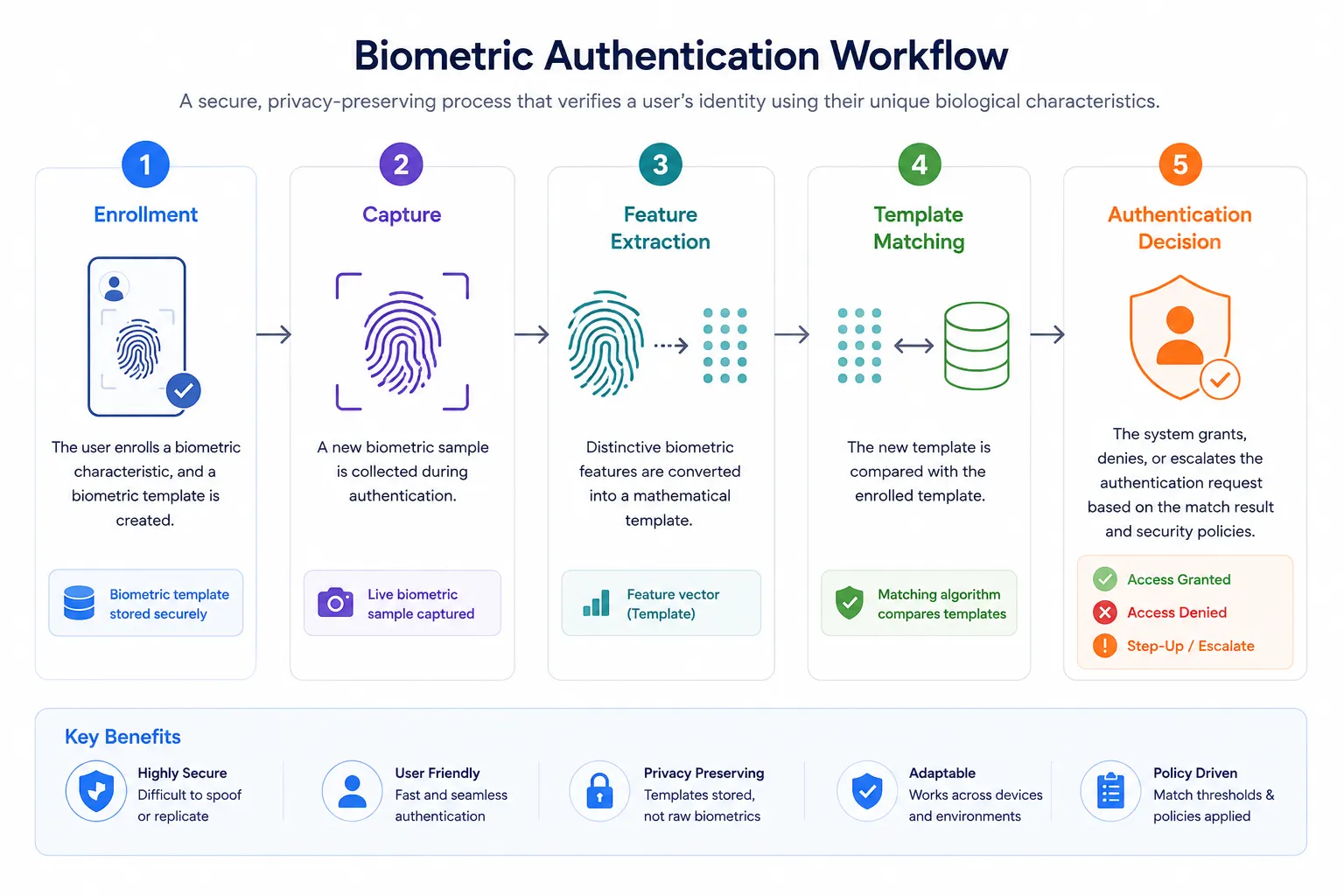
Step 1: User Enrollment
Before biometric authentication can be used, the user must enroll.
During enrollment, the system captures one or more biometric samples such as a fingerprint, face, or iris scan and extracts distinctive features from them. Rather than storing the original image, most modern systems generate a biometric template that represents those unique characteristics.
This template becomes the reference for future authentication attempts.
Step 2: Biometric Capture
When the user attempts to sign in, the device captures a new biometric sample using an appropriate sensor, such as a fingerprint reader, infrared camera, or microphone.
Environmental conditions like lighting, finger placement, or background noise may affect image quality, which is why most systems perform quality checks before continuing.
Step 3: Feature Extraction
The captured sample is analyzed to identify distinguishing characteristics.
For example:
-
A fingerprint system analyzes ridge endings and bifurcations.
-
Facial recognition measures relationships between key facial landmarks.
-
Iris recognition maps unique patterns within the iris.
-
Voice authentication evaluates vocal characteristics rather than spoken words.
These characteristics are converted into another biometric template for comparison.
Step 4: Template Matching
The newly generated template is compared with the enrolled template stored securely by the authentication system.
Unlike passwords, biometric authentication isn't an exact match. Every scan varies slightly because of natural differences in angle, pressure, lighting, or movement.
Instead, the system calculates a similarity score. If that score exceeds the configured threshold, the user is authenticated. Otherwise, authentication fails or an alternative verification method is requested.
Step 5: Authentication Decision
After the comparison is complete, the authentication system applies security policies before making a final decision.
Depending on the application and level of risk, it may:
-
Grant access immediately.
-
Request an additional authentication factor.
-
Ask the user to repeat the biometric scan.
-
Block the authentication attempt if suspicious activity is detected.
Modern authentication systems often combine biometric authentication with contextual risk signals such as device reputation, location, or user behavior to make more informed access decisions.
Where Is Biometric Data Stored?
Most modern consumer authentication systems do not send fingerprints or facial images to the application every time a user logs in. Instead, biometric templates are typically stored and processed within secure hardware on the user's device, such as Apple's Secure Enclave or Android's Trusted Execution Environment (TEE).
The biometric check happens locally, and the application receives only the result of the authentication, not the user's raw biometric data. This approach improves privacy, reduces the risk of exposing sensitive biometric information, and forms the foundation of modern passwordless authentication experiences such as passkeys.
Biometric authentication is a multi-step process that includes enrollment, biometric capture, feature extraction, template matching, and an authentication decision. Modern implementations typically protect biometric templates within secure device hardware, allowing users to authenticate without exposing their raw biometric data to applications.
Types of Biometric Authentication
Not all biometric authentication methods work the same way.
Some rely on physical characteristics that remain relatively stable over time, while others analyze behavioral patterns that evolve as people interact with devices. The right choice depends on the level of security required, the devices users already have, and the overall customer experience you're trying to deliver.
The following are the most widely used biometric authentication methods today.
Fingerprint Recognition
Fingerprint authentication identifies users by analyzing the unique ridge patterns and minutiae points on their fingertips. Because fingerprint sensors are now standard on many smartphones, laptops, and enterprise devices, it's one of the most widely adopted biometric authentication methods.
Its biggest advantage is speed. Authentication typically takes less than a second, making fingerprints well suited for mobile banking, workforce access, password managers, and everyday device authentication. Performance can decline, however, if fingers are wet, dirty, injured, or the sensor quality is poor.
Facial Recognition
Facial recognition authenticates users by analyzing the relationships between key facial landmarks rather than comparing simple photographs.
Modern systems often combine infrared sensors, depth mapping, and liveness detection to distinguish a real person from printed images or digital displays. This creates a fast, contactless authentication experience that has become common on smartphones, customer applications, airports, and access control systems.
Performance can still vary depending on lighting conditions, camera quality, or whether the implementation relies on advanced 3D sensing or basic image recognition.
Iris Recognition
Iris recognition analyzes the intricate patterns surrounding the pupil. These patterns remain remarkably stable throughout adulthood and provide one of the highest levels of biometric accuracy.
Because specialized cameras are typically required, iris recognition is more common in border control, government identity programs, healthcare, and high-security enterprise environments than in everyday consumer applications.
Voice Recognition
Voice authentication verifies identity by analyzing vocal characteristics such as pitch, tone, cadence, and resonance rather than the specific words being spoken.
It works well for telephone banking, contact centers, and voice-enabled digital services where physical sensors may not be available. Background noise, illness, or changes in speaking patterns can affect recognition accuracy, so many organizations combine voice recognition with additional authentication methods.
Palm and Vein Recognition
Palm print and vein recognition authenticate users by analyzing unique characteristics of the hand, including palm geometry or the vein patterns beneath the skin.
Because these characteristics are difficult to replicate, they're often used in healthcare, financial services, manufacturing, and other environments where stronger physical access controls are required. Their adoption is generally limited by specialized hardware requirements.
Behavioral Biometrics
Here's where biometric authentication starts looking very different. Behavioral biometrics doesn't analyze physical characteristics. Instead, it observes how users naturally interact with devices.
Some common behavioral signals include:
-
Typing rhythm
-
Mouse movements
-
Touchscreen gestures
-
Device handling
-
Navigation patterns
Rather than replacing login, behavioral biometrics continuously evaluates user behavior throughout a session. If activity suddenly changes for example, typing speed, navigation patterns, or device interactions become unusual the system can trigger step-up authentication or flag the session as potentially fraudulent.
Multimodal Biometrics
Some organizations rely on more than one biometric characteristic.
Multimodal biometric authentication combines two or more biometric methods, such as facial recognition and fingerprint authentication, or voice recognition with behavioral biometrics. Requiring multiple biometric signals generally improves accuracy and resilience while reducing the likelihood of false matches.
This approach is increasingly used for high-risk transactions, regulated industries, and environments that require stronger identity assurance.
Biometric Authentication Methods Compared
| Method | How It Works | Strengths | Limitations | Common Use Cases |
|---|---|---|---|---|
| Fingerprint | Analyzes fingerprint ridge patterns | Fast, familiar, widely supported | Sensor quality and finger condition can affect accuracy | Smartphones, banking apps, workforce access |
| Facial Recognition | Maps facial landmarks and depth information | Contactless, convenient, quick authentication | Lighting, camera quality, and implementation affect performance | Mobile devices, customer apps, airports |
| Iris Recognition | Compares unique iris patterns | Extremely accurate and stable | Requires specialized hardware | Government, healthcare, border control |
| Voice Recognition | Analyzes vocal characteristics | Ideal for remote authentication | Sensitive to background noise and voice changes | Call centers, telephone banking |
| Palm & Vein Recognition | Examines palm geometry or vein patterns | Difficult to replicate, highly secure | Limited hardware availability | Physical access, healthcare, finance |
| Behavioral Biometrics | Monitors user interaction patterns | Continuous risk assessment without interrupting users | Requires ongoing behavioral analysis | Fraud detection, adaptive authentication |
| Multimodal Biometrics | Combines multiple biometric methods | Higher accuracy and stronger identity assurance | Increased implementation complexity | High-security environments, regulated industries |
No single biometric authentication method is ideal for every application.
Consumer applications often prioritize speed and convenience, making fingerprints and facial recognition the preferred choice. High-security environments may benefit from iris recognition or multimodal biometrics, while organizations focused on fraud prevention increasingly use behavioral biometrics alongside traditional authentication methods.
The best biometric authentication method depends on your security requirements, user experience goals, device capabilities, and deployment environment. Rather than relying on a single technology, many organizations combine multiple biometric methods to improve both security and usability.
Benefits of Biometric Authentication
Biometric authentication has become a standard part of many digital experiences—not because it's a replacement for every authentication method, but because it helps organizations strengthen security while making authentication faster and easier for legitimate users.
When implemented correctly, biometrics reduce reliance on passwords, simplify login experiences, and provide stronger confidence that the person requesting access is the legitimate account owner.
Here are some of the biggest advantages.
Faster and More Convenient Authentication
Few users enjoy typing long passwords or waiting for one-time passcodes.
A fingerprint scan or face recognition check typically takes only a second, allowing users to authenticate with minimal effort. That convenience reduces friction during sign-in and encourages customers to complete authentication rather than abandoning the process.
For businesses, smoother authentication often translates into higher engagement and a better overall customer experience.
Reduces Password Dependence
Passwords are still widely used, but they're also one of the biggest sources of user frustration and security incidents. Biometric authentication reduces the need to remember complex passwords or reuse the same credentials across multiple accounts. In many modern authentication flows, a biometric check simply unlocks a secure credential stored on the user's device instead of requiring a password every time.
Less dependence on passwords also means fewer password reset requests and lower support costs.
Strengthens Identity Verification
Passwords prove that someone knows a secret.
Biometrics help verify that the person presenting that credential is the legitimate user.
That's why biometric authentication is commonly used for mobile banking, healthcare applications, digital wallets, and other services where confirming user identity is critical. When combined with additional authentication factors or risk signals, biometrics can significantly increase confidence in the authentication process.
Improves Mobile Authentication
Mobile devices have made biometric authentication part of everyday life.
Most modern smartphones include built-in fingerprint readers or facial recognition sensors, allowing users to authenticate quickly without additional hardware. Because the biometric check often happens locally on the device, authentication remains both fast and convenient while helping protect sensitive user data.
Supports Passwordless Authentication
Many people think biometrics replace passwords.
In practice, they often unlock a cryptographic credential that performs the actual authentication. This approach forms the foundation of many passwordless authentication experiences, including passkeys built on FIDO2 and WebAuthn standards.
The result is an authentication process that's easier for users and significantly more resistant to phishing than traditional password-based login.
Enhances Fraud Prevention
Biometric authentication makes it more difficult for attackers to access accounts using stolen passwords alone.
Many modern systems also incorporate liveness detection, device intelligence, and behavioral analysis to help identify suspicious authentication attempts. While biometrics are not immune to spoofing or presentation attacks, combining them with adaptive authentication and continuous risk evaluation provides stronger protection than relying on passwords alone.
Scales Across Multiple Industries
Biometric authentication is no longer limited to unlocking smartphones.
Some common use cases include:
-
Mobile and online banking
-
Healthcare portals
-
Government digital identity services
-
Retail and digital payments
-
Enterprise workforce access
-
Travel and border control
-
Customer self-service applications
As biometric sensors become more widely available, organizations across industries continue adopting biometric authentication to improve both security and user experience.
Biometric authentication delivers the greatest value when it's integrated into a broader identity strategy rather than deployed as a standalone security control. Combining biometrics with secure device hardware, adaptive authentication, and modern identity standards allows organizations to improve both security and customer experience without introducing unnecessary complexity.
The biggest advantage of biometric authentication isn't simply replacing passwords. It enables faster, more reliable identity verification while supporting modern authentication approaches such as passkeys, passwordless login, adaptive authentication, and secure customer identity management.
Risks and Limitations of Biometric Authentication
Biometric authentication offers significant security and usability benefits, but it isn't a perfect solution.
Like every authentication method, biometrics involve trade-offs. Accuracy, privacy, accessibility, device capabilities, and recovery processes all influence how effective a biometric authentication system will be in real-world deployments.
Understanding these limitations helps organizations build stronger authentication strategies instead of relying on biometrics alone.
Biometric Data Cannot Simply Be Reset
Passwords can be changed. Biometric characteristics generally cannot.
If a password is exposed, users create a new one. If a biometric template is compromised, the underlying fingerprint or facial characteristics remain the same for life. That's why modern authentication systems protect biometric templates using secure hardware, encryption, and strong access controls rather than storing raw biometric images.
Protecting biometric data from the beginning is essential because recovery options are far more limited than they are for passwords.
Presentation Attacks and Spoofing
Attackers continue looking for ways to bypass biometric systems. Some attempts involve printed photographs, recorded voices, artificial fingerprints, silicone molds, or deepfake technology designed to imitate legitimate users.
Modern biometric systems reduce these risks through liveness detection, anti-spoofing techniques, and secure device hardware. Even so, organizations should view biometrics as one layer of defense rather than a standalone security solution.
False Acceptances and False Rejections
Biometric authentication isn't based on exact matching. Every authentication attempt produces a probability score. Two important measurements help evaluate system performance:
-
False Acceptance Rate (FAR): The likelihood that an unauthorized user is incorrectly accepted.
-
False Rejection Rate (FRR): The likelihood that a legitimate user is incorrectly rejected.
Reducing one often increases the other. Organizations need to choose thresholds that balance security with usability based on their specific risk profile.
Privacy and Regulatory Considerations
Biometric data is among the most sensitive categories of personal information.
Many privacy regulations place strict requirements on how organizations collect, process, store, and retain biometric information. Users should understand what data is being collected, why it's needed, and how it will be protected throughout its lifecycle.
Transparency, informed consent, and data minimization are just as important as strong technical controls.
Accessibility and User Inclusion
Biometric authentication isn't suitable for every user.
Some people cannot provide reliable fingerprints due to age, injury, or certain occupations. Others may be unable to use facial recognition or voice authentication because of disabilities, medical conditions, or environmental factors.
Organizations should always provide accessible alternatives rather than making biometrics the only way to authenticate.
Environmental and Device Limitations
Biometric authentication depends on reliable sensors and suitable operating conditions.
Fingerprint readers may struggle with wet or damaged fingers. Facial recognition performance can vary depending on lighting or camera quality. Voice authentication may be affected by background noise.
Authentication systems should account for these conditions and provide secure fallback options when biometric verification cannot be completed successfully.
Recovery and Account Access
Here's where teams usually go wrong. Many organizations focus heavily on the login experience but spend very little time planning for recovery.
-
Users lose devices.
-
Sensors fail.
-
Hardware gets replaced.
If biometric authentication is unavailable, users still need a secure way to regain access to their accounts. Strong recovery mechanisms—such as passkeys on multiple devices, recovery codes, trusted devices, or step-up verification—are just as important as the biometric authentication process itself.
Biometrics Work Best as Part of a Layered Security Strategy
Biometric authentication shouldn't replace every other security control.
Instead, it should strengthen an overall identity strategy that includes phishing-resistant authentication, secure device hardware, adaptive authentication, risk analysis, session management, and continuous monitoring.
Combining multiple layers allows organizations to improve both security and customer experience without depending entirely on a single authentication method.
Biometric authentication is most effective when it's part of a broader authentication strategy rather than the only method available. Strong implementations combine biometrics with secure hardware, adaptive authentication, modern identity standards, and well-designed recovery processes to deliver both security and usability.
Biometric Compliance & Privacy Regulations
Storing biometric data carries heavy legal obligations:
-
GDPR (Article 9): Classifies biometrics as "special category data," requiring explicit consent and Data Protection Impact Assessments (DPIA).
-
BIPA: Enforces strict statutory damages for unauthorized collection or retention of biometric identifiers without written release.
Biometric Authentication vs. Passwords vs. Passkeys
As organizations modernize authentication, three approaches are often discussed together: passwords, biometrics, and passkeys. Although they're closely related, they solve different problems.
Passwords verify identity using something the user knows. Biometric authentication verifies identity using something the user is or how they behave. Passkeys use public key cryptography to authenticate users while often relying on biometrics or a device PIN to verify the person using the device.
Understanding these differences helps organizations choose the right authentication strategy instead of treating them as competing technologies.
Biometrics vs. Passwords
Passwords remain the most widely used authentication method because they're simple to implement and work across virtually every digital service.
Their biggest weakness is also well known. Passwords can be forgotten, reused, guessed, stolen through phishing, or exposed in data breaches.
Biometric authentication improves the user experience by removing the need to remember credentials while providing stronger confidence that the legitimate user is present. However, biometrics should not be viewed as a complete replacement for passwords in every environment. Secure recovery methods and alternative authentication options are still necessary.
Biometrics vs. Passkeys
Biometric authentication and passkeys are not alternatives. In many implementations, they work together.
When a user unlocks a passkey with a fingerprint or facial recognition, the biometric check usually happens on the device. If the user is successfully verified, the device unlocks a cryptographic private key that completes authentication using FIDO2 and WebAuthn standards.
The biometric information never replaces the passkey itself, nor is it typically shared with the website or application. Instead, it confirms that the legitimate device owner is authorizing the authentication request.
This combination delivers a smoother login experience while providing strong protection against phishing and credential theft.
Which Authentication Method Should You Choose?
The answer depends on your security requirements and user experience goals.
-
Passwords remain suitable for low-risk applications but require strong password policies and often Multi-Factor Authentication (MFA).
-
Biometric authentication provides fast, convenient identity verification and works well for mobile devices, customer applications, and step-up authentication.
-
Passkeys offer phishing-resistant authentication and are increasingly becoming the preferred choice for passwordless customer experiences.
For many organizations, the strongest solution isn't choosing one approach over another. It's combining modern authentication methods to balance usability, security, and recovery.
Authentication Methods Compared
| Feature | Passwords | Biometric Authentication | Passkeys |
|---|---|---|---|
| Primary authentication factor | Something you know | Something you are or how you behave | Cryptographic credential |
| User experience | Moderate | Excellent | Excellent |
| Password required | Yes | Not always | No |
| Phishing resistance | Low | Depends on implementation | High |
| Can be reset easily | Yes | No | Yes, by creating a new passkey |
| Device dependent | No | Usually | Yes |
| Typical use cases | Traditional web applications | Mobile apps, banking, workforce access | Passwordless authentication, modern web and mobile applications |
Rather than replacing one another, these authentication methods increasingly work together. Many passwordless authentication experiences use biometrics to unlock passkeys stored securely on a trusted device, combining the convenience of biometric verification with the strong cryptographic security of modern authentication standards.
Passwords, biometrics, and passkeys each serve a different purpose. While passwords rely on shared secrets and biometrics verify user identity, passkeys provide phishing-resistant authentication using public key cryptography often with biometrics acting as the user verification step rather than the authentication mechanism itself.
Common Use Cases of Biometric Authentication
Biometric authentication has moved far beyond smartphone unlocking.
Organizations across industries use biometrics to verify identities, reduce fraud, simplify authentication, and improve customer experiences. The specific biometric method often depends on the level of security required, regulatory obligations, available devices, and the type of user interaction.
Biometric Authentication Across Industries
| Industry | Common Use Cases | Typical Biometric Methods |
|---|---|---|
| Banking & Financial Services | Mobile banking login, transaction approval, account recovery | Fingerprint, facial recognition |
| Healthcare | Patient portal access, clinician authentication, prescription systems | Fingerprint, facial recognition, iris recognition |
| Retail & E-commerce | Customer login, digital wallets, payment authorization | Fingerprint, facial recognition |
| Government | National digital identity, border control, citizen services | Facial recognition, iris recognition, fingerprints |
| Travel & Aviation | Airport check-in, immigration, boarding verification | Facial recognition, iris recognition |
| Enterprise | Workforce authentication, VPN access, privileged account protection | Fingerprint, facial recognition, behavioral biometrics |
| Education | Student authentication, online examinations, campus access | Facial recognition, fingerprint authentication |
| Telecommunications | SIM registration, customer verification, account recovery | Facial recognition, voice authentication |
Although the use cases differ, the objective remains consistent: verify user identity quickly while reducing unnecessary friction for legitimate users.
Mobile Authentication
Mobile applications are one of the most common environments for biometric authentication.
Modern smartphones include built-in fingerprint readers and facial recognition sensors, allowing users to authenticate without entering passwords repeatedly. Many banking, healthcare, retail, and enterprise applications use these capabilities to streamline login, authorize sensitive actions, and support passwordless authentication experiences.
Because biometric verification is typically performed locally on the device, authentication can remain both fast and privacy-conscious.
Step-Up Authentication
Not every action carries the same level of risk. Viewing an account balance may require only a standard login, while transferring funds, changing account details, or approving high-value transactions may require additional verification.
Biometric authentication is frequently used as a step-up authentication factor, allowing organizations to request stronger verification only when the level of risk justifies it. This reduces unnecessary friction while providing additional protection for sensitive operations.
Continuous Risk Evaluation
Here's where biometric authentication continues to evolve. Organizations increasingly combine traditional biometric methods with behavioral biometrics, device intelligence, and contextual risk signals to evaluate user activity throughout a session not just during login.
Rather than interrupting every customer with repeated authentication prompts, the system can monitor for unusual behavior and request additional verification only when risk levels increase.
This approach improves both security and user experience by adapting authentication to changing circumstances.
Why Adoption Continues to Grow
Biometric authentication has become more practical as secure hardware, mobile devices, and passwordless authentication standards have become widely available.
Organizations can now provide faster authentication experiences while strengthening identity verification and reducing dependence on passwords. As a result, biometrics continue to play an increasingly important role in customer identity, workforce authentication, fraud prevention, and secure digital services.
Biometric authentication supports a wide range of industries and use cases, from mobile banking and healthcare to enterprise security and government services. The most effective implementations combine biometric verification with risk-based authentication to deliver stronger security without increasing user friction.
Biometric Authentication Best Practices
Implementing biometric authentication involves more than choosing a fingerprint reader or enabling facial recognition. Organizations need to protect biometric data, provide reliable recovery options, accommodate different users and devices, and ensure authentication remains both secure and convenient over time.
The following best practices can help build a secure and scalable biometric authentication strategy.
1. Store Biometric Templates Securely
Raw biometric images should never be stored unnecessarily.
Modern biometric authentication systems typically generate encrypted biometric templates and protect them using secure hardware such as Apple's Secure Enclave or Android's Trusted Execution Environment (TEE). Keeping biometric matching on the user's device whenever possible reduces privacy risks and limits exposure of sensitive biometric information.
2. Use Biometrics Alongside Modern Authentication
Biometric authentication should strengthen your authentication strategy—not replace it entirely.
Many modern authentication systems combine biometrics with passkeys, Multi-Factor Authentication (MFA), adaptive authentication, or risk-based authentication to improve both security and usability. Layered authentication provides better protection than relying on any single factor alone.
3. Implement Liveness Detection
Authentication systems should confirm they're interacting with a real person rather than a photograph, video, recording, or artificial replica.
Liveness detection and presentation attack detection help reduce spoofing attempts while improving confidence that the legitimate user is completing the authentication process.
4. Provide Secure Recovery Options
Here's where teams usually go wrong. Authentication receives significant attention. Recovery often doesn't.
Users replace phones, damage fingerprint sensors, or lose access to enrolled devices. Every biometric authentication deployment should include secure recovery mechanisms such as passkeys on multiple devices, recovery codes, trusted devices, or verified account recovery workflows.
5. Design for Privacy and Compliance
Biometric information is highly sensitive.
Organizations should collect only the biometric data necessary for authentication, explain how it will be used, obtain appropriate consent where required, and comply with applicable privacy regulations. Clear privacy practices strengthen customer trust while supporting regulatory obligations.
6. Support Accessibility and Choice
Not every user can authenticate with the same biometric method.
Some users may have physical limitations, incompatible devices, or privacy concerns that prevent them from using fingerprints or facial recognition. Supporting multiple authentication options helps create a more inclusive and resilient authentication experience.
7. Monitor Authentication Performance
Successful implementation isn't just about deployment.
Organizations should monitor authentication success rates, false acceptance rates, false rejection rates, failed login attempts, recovery requests, and unusual authentication patterns. These metrics help identify usability issues and improve security policies over time.
8. Plan for Future Authentication Standards
Authentication continues to evolve. Choose a biometric authentication solution that supports modern standards such as passkeys, FIDO2, WebAuthn, adaptive authentication, and passwordless authentication. A flexible architecture reduces future migration effort while allowing your authentication strategy to evolve alongside emerging technologies.
Strong biometric authentication isn't defined by a single technology. It's the result of combining secure storage, thoughtful recovery processes, privacy protections, modern authentication standards, and continuous monitoring into a cohesive identity strategy.
The most effective biometric authentication implementations don't rely on biometrics alone. They combine secure biometric storage, layered authentication, accessible recovery options, privacy-first design, and continuous monitoring to deliver authentication that's both secure and user-friendly.
How to Choose the Right Biometric Authentication Method
There isn't a single biometric authentication method that's ideal for every organization.
The right choice depends on the level of security you need, the devices your users already have, the environments in which authentication takes place, and the balance you want to strike between convenience, privacy, and implementation complexity.
Before selecting a biometric authentication method, evaluate the following factors.
| Evaluation Factor | Questions to Consider |
|---|---|
| Security | What level of identity assurance is required? |
| User Experience | How quickly and easily should users authenticate? |
| Device Support | Which biometric sensors are already available to users? |
| Privacy | Where are biometric templates stored and how is consent managed? |
| Accessibility | Are secure alternatives available for users who cannot use biometrics? |
| Scalability | Can the solution support future growth and new authentication methods? |
| Integration | Does it work with existing applications, identity providers, and APIs? |
| Standards Support | Does it support passkeys, FIDO2, WebAuthn, and adaptive authentication? |
Choosing the right biometric authentication method is rarely about selecting the most advanced technology. It's about finding the approach that fits your users, your applications, and your security requirements while remaining flexible enough to support future authentication needs.
How LoginRadius Supports Biometric Authentication
Deploying biometric authentication involves much more than enabling fingerprint or facial recognition.
Organizations also need to protect customer identities, support multiple authentication methods, manage secure account recovery, comply with privacy requirements, and integrate authentication across web, mobile, and API-driven applications.
LoginRadius helps organizations deliver secure biometric authentication as part of a comprehensive Customer Identity and Access Management (CIAM) platform.
Passwordless Authentication Built for Modern Applications
LoginRadius supports passwordless authentication experiences that reduce dependence on traditional passwords while making authentication faster and more convenient for customers.
Organizations can combine biometric authentication with modern authentication standards such as passkeys, allowing users to authenticate securely using the trusted capabilities already built into their devices.
Adaptive Authentication for Higher-Risk Scenarios
Not every authentication attempt carries the same level of risk.
LoginRadius evaluates contextual signals such as device information, location, IP reputation, and user behavior to determine when additional verification may be required. Instead of interrupting every customer with repeated authentication requests, adaptive authentication applies stronger verification only when risk levels increase.
Flexible Authentication Options
Different applications often require different authentication experiences.
LoginRadius enables organizations to support multiple authentication methods including passwords, passkeys, Multi-Factor Authentication (MFA), social login, and biometric authentication allowing security policies to evolve without redesigning the entire identity infrastructure.
Secure Identity Lifecycle Management
Biometric authentication is only one part of the customer identity journey.
LoginRadius helps organizations manage customer registration, authentication, authorization, profile management, consent, user lifecycle management, and account recovery from a centralized CIAM platform. This allows businesses to deliver consistent identity experiences across web applications, mobile apps, APIs, and customer portals.
Developer-Friendly Integration
Identity should accelerate development—not slow it down.
LoginRadius provides APIs, SDKs, developer tools, and integration capabilities that simplify implementing biometric authentication alongside existing applications and identity workflows. This gives development teams the flexibility to introduce modern authentication while minimizing implementation complexity.
LoginRadius Biometric Authentication Capabilities
| Capability | Business Benefit |
|---|---|
| Passwordless authentication | Reduces password dependence and simplifies login |
| Passkey support | Enables phishing-resistant authentication on supported devices |
| Adaptive authentication | Requests additional verification only when risk increases |
| Multi-Factor Authentication (MFA) | Adds additional layers of identity protection |
| Identity lifecycle management | Manages customer identities from registration through account recovery |
| APIs and SDKs | Simplifies integration across web, mobile, and API environments |
| Centralized CIAM platform | Provides consistent identity management across digital channels |
Biometric authentication delivers the greatest value when it's part of a broader identity strategy rather than a standalone capability. LoginRadius combines modern authentication, adaptive security, and comprehensive customer identity management to help organizations deliver secure, scalable, and frictionless digital experiences.
Discover how LoginRadius can help you implement secure biometric authentication, passwordless login, and modern CIAM capabilities. Schedule a personalized demo to see how you can strengthen customer identity security while delivering a seamless authentication experience.
Conclusion
Biometric authentication has transformed the way people prove their identity.
What once felt like a premium smartphone feature is now a core part of modern digital experiences. From mobile banking and healthcare portals to enterprise applications and government services, organizations are using biometric authentication to make login faster, strengthen identity verification, and reduce dependence on passwords.
But successful biometric authentication isn't defined by technology alone.
The strongest implementations combine secure biometric verification with modern authentication standards, privacy-first design, accessible recovery options, and continuous risk evaluation. When these elements work together, organizations can deliver authentication experiences that are both secure and remarkably simple for legitimate users.
As passwordless authentication, passkeys, and adaptive authentication become more widely adopted, biometrics will continue to play an increasingly important role in verifying user identity. The goal isn't to replace every existing authentication method—it's to build authentication journeys that adapt to different users, devices, and levels of risk while maintaining trust at every interaction.
Simplify Biometric Authentication with LoginRadius
Implementing biometric authentication shouldn't require stitching together multiple identity solutions or managing complex authentication workflows on your own.
LoginRadius provides a comprehensive Customer Identity and Access Management (CIAM) platform that helps organizations integrate biometric authentication alongside passkeys, passwordless authentication, Multi-Factor Authentication (MFA), adaptive authentication, and the complete customer identity lifecycle—all from a single platform.
Whether you're launching a new customer application, modernizing an existing authentication system, or building passwordless experiences at scale, LoginRadius gives you the flexibility to deliver secure, seamless, and future-ready authentication.
Ready to modernize your customer authentication? Schedule a personalized LoginRadius demo and see how biometric authentication can become part of a secure, scalable identity strategy built for today's digital experiences.
FAQs
Q: What is biometric authentication?
A: Biometric authentication is a method of verifying a user's identity using unique physical or behavioral characteristics, such as fingerprints, facial recognition, iris patterns, or voice recognition. It helps confirm that the person requesting access is the legitimate user.
Q: How does biometric authentication work?
A: Biometric authentication captures a biometric sample, converts it into a secure biometric template, and compares it with a previously enrolled template. If the similarity score meets the required threshold, the user is authenticated.
Q: What are the different types of biometric authentication?
A: Common biometric authentication methods include fingerprint recognition, facial recognition, iris recognition, voice recognition, palm or vein recognition, and behavioral biometrics. Each method offers different levels of security, convenience, and deployment requirements.
Q: Is biometric authentication more secure than passwords?
A: Biometric authentication generally provides stronger identity verification than passwords alone because biometric traits are difficult to guess or share. However, the strongest security comes from combining biometrics with technologies such as passkeys, Multi-Factor Authentication (MFA), or adaptive authentication.
Q: What is the difference between biometric authentication and biometric identification?
A: Biometric authentication verifies a claimed identity through one-to-one matching, while biometric identification searches a database to determine an unknown person's identity through one-to-many matching.
Q: Where is biometric data stored?
A: Most modern devices store encrypted biometric templates locally in secure hardware such as Apple's Secure Enclave or Android's Trusted Execution Environment (TEE). Applications typically receive only the authentication result, not the user's raw biometric data.
Q: Can biometric authentication be hacked?
A: Like any security technology, biometric authentication is not immune to attacks. Modern systems reduce risks through encrypted biometric templates, liveness detection, secure hardware, and layered authentication controls.
Q: What are the advantages of biometric authentication?
A: Biometric authentication offers faster login, improved user experience, reduced reliance on passwords, stronger identity verification, and support for passwordless authentication while simplifying access across digital services.
Q: What are the limitations of biometric authentication?
A: Biometric authentication can be affected by sensor quality, environmental conditions, accessibility challenges, and privacy considerations. Organizations should also provide secure recovery methods if biometric authentication isn't available.
Q: What is the difference between biometric authentication and passkeys?
A: Biometric authentication verifies the person using a device, while passkeys authenticate the device using public key cryptography. In many passwordless login flows, biometrics unlock the passkey rather than replacing it.
Q: Can biometric authentication be used with Multi-Factor Authentication (MFA)?
A: Yes. Biometric authentication is commonly used as one factor within an MFA strategy or as a step-up authentication method for higher-risk transactions, providing stronger identity assurance without significantly increasing user friction.
Q: Which industries use biometric authentication?
A: Biometric authentication is widely used across banking, healthcare, government, retail, travel, telecommunications, and enterprise applications to secure customer accounts, workforce access, payments, and digital identity verification.
Q: What are biometric templates?
A: A biometric template is a mathematical representation of a user's biometric characteristics created during enrollment. Modern authentication systems compare templates rather than storing or matching raw fingerprints or facial images.
Q: How does biometric authentication support passwordless login?
A: Biometric authentication enables users to verify their identity without entering a password. In many passwordless implementations, a fingerprint or face scan unlocks a secure passkey stored on the user's device, allowing authentication through FIDO2 and WebAuthn standards.
Q: What are the best practices for implementing biometric authentication?
A: Organizations should securely store biometric templates, implement liveness detection, support modern authentication standards, provide accessible recovery options, protect user privacy, and combine biometrics with layered security controls for stronger identity protection.