Introduction
The expectations of a new-age customer is: creating an online account should be quick. Yet most brands follow the familiar routine: enter an email address, create another password, satisfy complexity requirements, verify the email, complete a form, and finally get to the product.
For someone who just wants to shop, stream a video, book a trip, or try a SaaS product, that's a lot of effort before receiving any value.
Social login offers a shorter route. Instead of creating another set of credentials (which they most probably will forget), customers can choose to Continue with Google, Sign in with Apple, Continue with Microsoft, or another familiar identity provider and use an account they already have. The experience looks simple.
A secure social login implementation however is anything but simple. It has to deal with OAuth 2.0, OpenID Connect (OIDC), tokens, provider-specific attributes, consent, account linking, sessions, recovery, and privacy. Add several providers across multiple applications and regions, and what looks like a login button becomes an identity architecture decision.
So in this article, we will explain what exactly is social login, what happens after someone clicks that button, and when does it make sense for your application?
What Is Social Login?
Social login lets users register or sign in to an application with an account they already have from an external provider, such as Google, Apple, Facebook, Microsoft, or GitHub. Instead of creating another application-specific credential, the user authenticates with the provider they already use.
The application doesn't receive the password the user enters with that provider. Authentication takes place with the external identity provider, which returns identity information that the application can use to recognize the user and establish an account or session. Modern social login commonly relies on OAuth 2.0 and OpenID Connect (OIDC) for these exchanges.
Social login is particularly useful in customer-facing applications because it can reduce registration friction and give users more choice over how they access an account. It is common across ecommerce, consumer applications, mobile experiences, and self-service SaaS.
How Does Social Login Work?
From the customer's perspective, social login may take only a few interactions. They choose a provider, authenticate if necessary, approve the requested information, and return to the application signed in. Behind that short journey is a standards-based identity exchange.
The Social Login Authentication Flow
A typical flow looks like this:
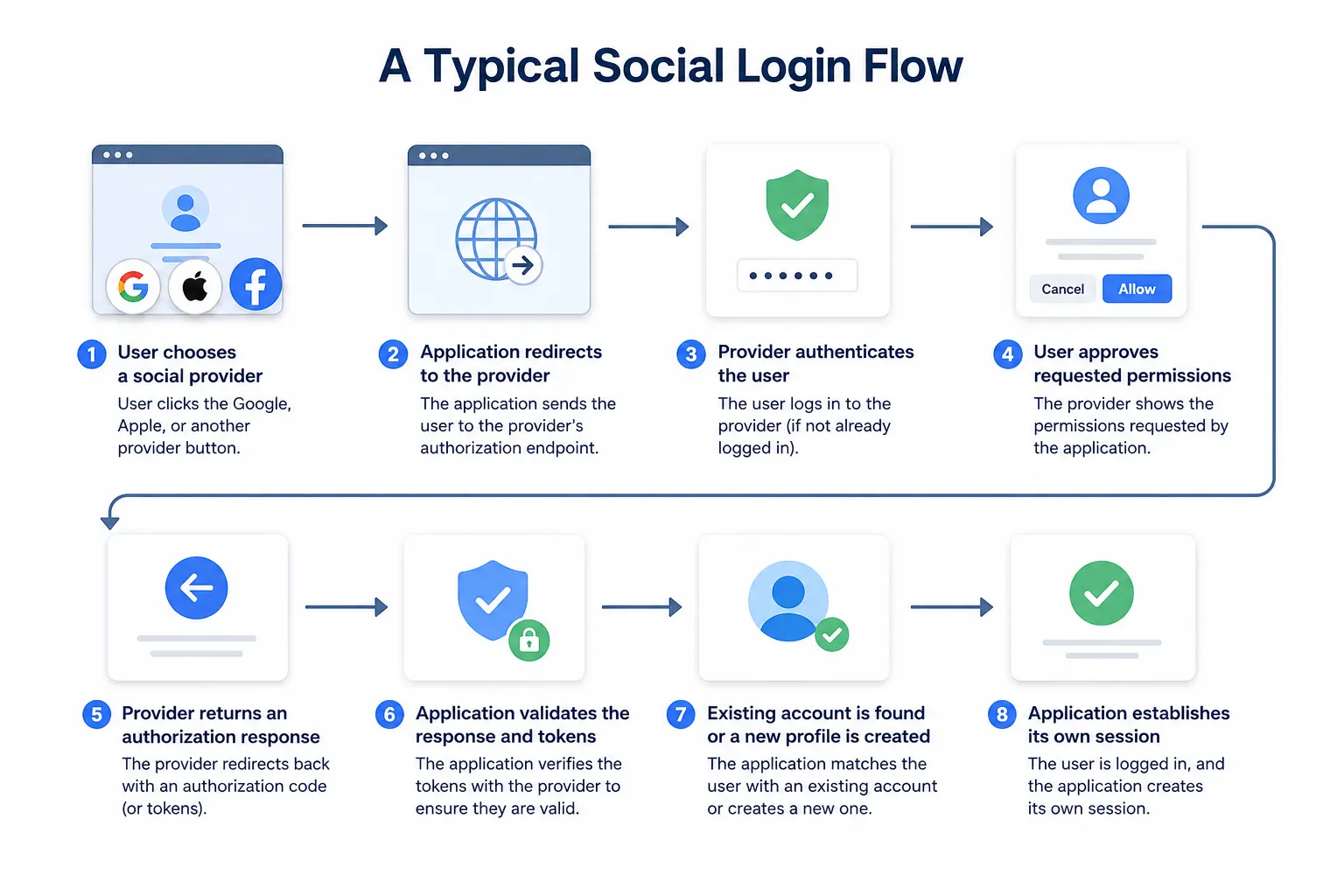
Suppose a customer selects Continue with Google.
The application first sends an authorization request to Google. That request typically contains information such as the application's client ID, approved redirect URI, requested scopes, and security parameters such as state. OpenID Connect flows can also use a nonce to bind the authentication request to the resulting ID token.
Google then authenticates the customer. If they're already signed in, this can happen quickly. Otherwise, Google handles its own authentication process, which may involve a password, passkey, MFA, device checks, or other security controls.
Notice what's missing: your application never needs the customer's Google password.
After authentication, the customer may be shown a consent screen explaining what information the application is requesting. Once approved, the provider returns an authorization response, commonly including a short-lived authorization code.
The application exchanges that code through the appropriate back-channel flow. With OpenID Connect, it can receive an ID token containing identity claims about the authenticated user. An access token may also be issued for permitted API or UserInfo access, depending on the implementation.
The application then validates the required response and token properties before trusting the identity. Only after those checks should it locate or create the customer account and establish its own authenticated session.
Where OAuth 2.0 and OpenID Connect Fit
OAuth 2.0 and OpenID Connect are often mentioned together when discussing social login, but they don't serve exactly the same purpose.
OAuth 2.0 is an authorization framework. It provides a way for an application to receive limited access to resources without asking for the user's credentials.
OpenID Connect adds an identity layer on top of OAuth 2.0. It enables an application to authenticate a user and receive standardized identity claims, including through an ID token.
That's why casually calling every social authentication flow “OAuth login” can be misleading. OAuth addresses authorization; OpenID Connect provides the authentication and identity layer used by many modern social sign-in implementations.
What Information Does Social Login Return?
The exact customer information available depends on the provider, requested scopes, user consent, and provider policy. The information usually returned are:
| Attribute | Usually Available? |
|---|---|
| User ID | Yes |
| Often | |
| Verified Email | Sometimes |
| Name | Usually |
| Avatar | Often |
| Locale | Depends |
Applications shouldn't assume every provider returns the same fields—or that an email address will always be available.
Apple is a useful example. A customer using Sign in with Apple can choose Hide My Email, allowing Apple to provide a relay address rather than the customer's personal email. Other providers have their own scope restrictions and profile schemas.
This inconsistency becomes more noticeable as the number of providers grows. A CIAM layer can normalize provider-specific attributes into a consistent customer profile rather than forcing each application to maintain separate mapping logic.
Account Creation and Identity Linking
After the provider identity has been validated, the application has another decision to make: Is this a new customer or someone who already has an account?
For a new customer, the application can create a profile using the approved identity information.
Returning customers should be mapped back to their existing profile. And if someone initially registered with Google but later wants to use Apple or Microsoft, secure account linking can associate those identities with the same customer account.
Without that capability, each user can easily become two or three customer records.
Account linking has to be handled carefully, though. Applications shouldn't automatically merge accounts simply because two providers return the same email address. Sufficient verification should establish that the customer legitimately controls the identities being linked.
Social Login vs Other Related Terms
Social login, Single Sign-On (SSO), and federated identity are related because they can all involve relying on another identity system to authenticate a user. But they aren't interchangeable terms.
Social login is primarily a customer authentication method. A user signs in to an application with an existing account from a provider such as Google, Apple, Microsoft, Facebook, or GitHub. The usual goal is to simplify registration and repeat login.
SSO solves a different problem. It allows a user to authenticate once and access multiple connected applications without signing in separately to each one. It's commonly associated with enterprise environments, although SSO can also support customer-facing scenarios.
Federated identity describes the broader trust relationship that allows one system to rely on identity or authentication performed by another trusted identity provider.
| Approach | Primary Purpose | Identity Provider | Typical Users | Common Standards |
|---|---|---|---|---|
| Social Login | Simplify registration and login | Google, Apple, Microsoft, Facebook, GitHub, etc. | Customers and external users | OAuth 2.0, OpenID Connect |
| SSO | Access multiple applications after authentication | Enterprise or customer identity provider | Employees, partners, customers | SAML, OpenID Connect |
| Federated Identity | Establish identity trust across separate systems or domains | Trusted external identity provider | Customers, employees, partners | SAML, OpenID Connect |
The easiest distinction is purpose. Social login answers, “Can I use an identity I already have to access this application?” SSO answers, “Can one authentication give me access to multiple applications?” Federation describes the trust relationship that can make these experiences possible.
They can also coexist. A B2B SaaS platform might offer Google or GitHub login for self-service customers while supporting enterprise SSO for organizations that want employees to authenticate through a corporate identity provider.
Social Login vs Passwordless Authentication
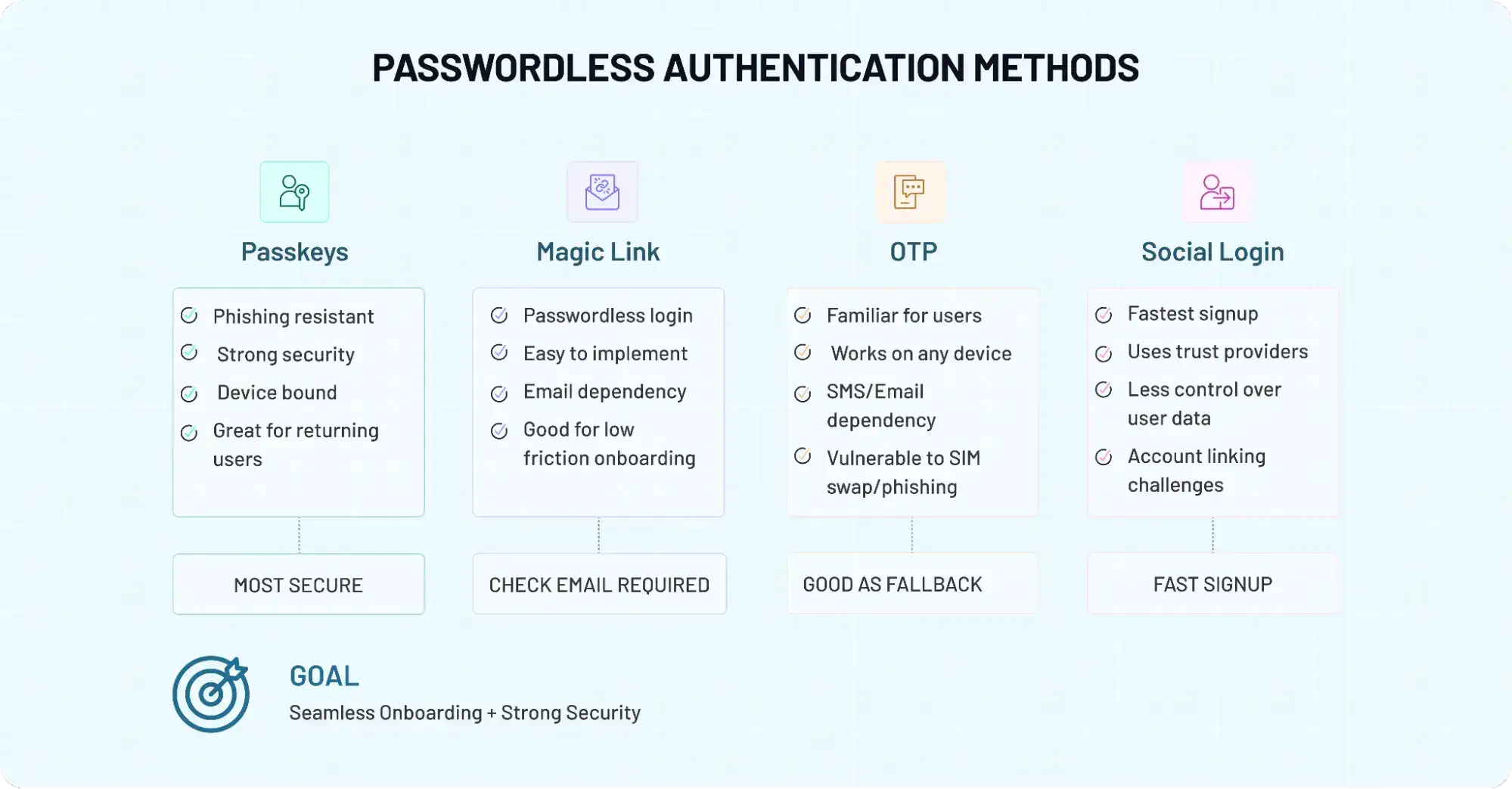
Benefits of Social Login for Businesses and Customers
Traditional registration often asks customers to do more work than necessary before they receive any value. Create a password. Meet complexity requirements. Verify an email address. Complete several fields. On mobile, even a few extra steps can interrupt the journey.
The friction continues after registration. Passwords are forgotten, reused, and reset. Every failed login or recovery attempt creates another obstacle for the customer and potentially more support work for the business.
Social login reduces much of that effort by letting customers authenticate with an identity they already use. But convenience is only part of the value. Done well, it can improve acquisition, simplify repeat access, provide more consistent identity data, reduce some password-related exposure, and lower the engineering burden of supporting customer authentication.
Faster Registration and Better Conversion
Account creation is often the first meaningful commitment a customer makes. Asking someone to create a new credential before they've experienced much value adds another reason to leave.
Social login shortens that journey. A customer can choose a familiar provider, authenticate there, approve the requested information, and continue without manually creating another username and password.
The difference can be particularly noticeable on mobile, where typing complex passwords, completing multiple fields, and moving between applications for verification can interrupt an otherwise simple signup.
Fewer steps don't guarantee better conversion by themselves. Provider choice, button placement, consent requests, and the rest of the onboarding journey still matter. But removing unnecessary credential creation gives an interested customer one less hurdle to clear.
Easier Sign-In and Account Access
The benefit continues after registration.
Returning customers don't need to remember which password they created months ago or immediately enter a password-reset flow. They can authenticate through a provider they already recognize and may already be signed into on their device.
That can make repeat access easier across web and mobile while reducing password fatigue.
Choice still matters. Social login shouldn't become the only route into an account. Customers may prefer another authentication method, lose access to a provider, or encounter a provider outage. Maintaining appropriate alternatives and recovery paths prevents convenience from becoming dependency.
Fewer Password-Related Security and Support Problems
Every application-managed password introduces responsibilities around secure storage, reset flows, recovery, credential attacks, and customer support.
Social login changes that boundary. The application doesn't receive or store the password used to authenticate with the external provider.
That can reduce direct exposure to attacks targeting locally managed credentials, including password reuse, brute-force attempts, and credential stuffing against an application password that no longer exists for that user. It can also reduce password-reset journeys for customers who primarily use social authentication.
But social login doesn't remove account-security responsibilities. Token validation, session security, recovery, identity linking, risk monitoring, and additional verification for sensitive actions still belong in the application's security model.
More Consistent Customer Identity Data
Manual registration depends on information customers type themselves. Social providers can instead return stable identifiers and approved profile attributes such as a name or verified email status where available.
That can give applications a more consistent starting point for customer profiles.
The bigger benefit appears over time. If identities are linked correctly, a customer can add or change authentication methods without creating another profile. Their preferences, history, consent records, and other account information remain associated with the same identity.
Cleaner customer records can support personalization, segmentation, and cross-device continuity. Still, social login shouldn't become an excuse to collect extra data. Request what the application genuinely needs and no more.
Less Authentication Integration and Maintenance Work
One social provider may be relatively straightforward to maintain. Seven providers across multiple applications and regions are a different story.
Providers have different configuration requirements, scopes, APIs, identity schemas, policies, and release cycles. Changes have to be tracked over time.
A centralized CIAM approach can reduce that work by placing a common identity layer between applications and individual providers. Token handling, attribute mapping, identity linking, and authentication policies can be managed more consistently instead of recreated for every integration.
The advantage isn't just faster initial implementation. It's less provider-specific authentication logic to maintain as the business grows.
For a more detailed evaluation of benefits and limitations of social login, please read this article.
Is Social Login Secure?
Social login can be secure when implemented correctly. The important part of that sentence is when it's implemented correctly.
Delegating authentication to Google, Apple, Microsoft, or another established identity provider means your application doesn't need to collect the password for that provider. Those providers may also apply protections such as MFA, passkeys, suspicious-login detection, device intelligence, and other risk controls to their own accounts.
But a familiar provider logo doesn't automatically make the rest of your application secure.
The User's Provider Password Stays With the Provider
When someone chooses Continue with Google, their Google credentials are entered and verified within Google's authentication environment rather than your application.
That reduces the amount of credential material your application has to handle. For users who rely exclusively on social login, there may be no application-specific password to store or reset at all.
The security benefit has a boundary. If the customer's upstream provider account is compromised, connected applications may also be exposed. That's another reason high-risk applications and actions shouldn't rely on the existence of a social identity alone.
Token Validation Still Matters
The identity provider may authenticate the customer, but the application still has to establish that the authentication response is legitimate and intended for it.
Incorrect validation can allow manipulated, expired, or improperly issued responses to undermine the login flow. Using a trusted social provider therefore doesn't eliminate application-side security responsibilities.
Secure the Application Session
The social provider authenticates the user, but your application generally establishes and manages its own session afterward.
That session needs protection.
Use HTTPS, secure cookie settings where applicable, appropriate session expiration, logout and revocation controls, and defenses against session theft or misuse. Authentication is the beginning of the logged-in journey, not the end of application security.
Consider the Risk of a Compromised Provider Account
Social login can concentrate trust in an upstream identity. If someone gains control of a customer's Google, Apple, Microsoft, or other provider account, applications connected to that identity may also face risk.
Applications should therefore evaluate what access a social authentication event is allowed to unlock. Logging into a shopping account and changing a recovery method aren't necessarily equivalent risk events.
Add Stronger Verification for Higher-Risk Actions
A customer may enter an account through social login and still be asked for additional verification before performing a sensitive action.
Changing security settings, modifying payment information, accessing sensitive records, linking another identity, or performing administrative actions can justify MFA, adaptive authentication, identity verification, or another step-up control.
This allows the initial login to remain convenient without treating every authenticated session as equally trustworthy forever.
Social Login Privacy, Consent, and Data Protection
Convenience attracts users to social login. Privacy can make them hesitate.
What exactly does an application receive after someone clicks Continue with Google? Can it read their emails? See their contacts? Access their photos?
Simply enabling social login doesn't automatically grant that level of access.
The information an application can receive depends on the provider, requested scopes, provider policy, and what the user authorizes. For many authentication use cases, a stable provider identifier and limited profile information are enough.
Request Only the Data You Need
Just because a provider makes an attribute or permission available doesn't mean the application should request it.
If an email address and basic profile information are enough to create the account, asking for contacts, calendars, or unrelated profile information introduces privacy concerns without improving authentication.
Data minimization also makes the consent experience easier to understand.
The question for teams should be simple: Will the product actually use this information for a legitimate, explained purpose? If not, don't request it.
Make Consent Understandable
Consent shouldn't feel like a technical obstacle customers have to click through.
Users should be able to understand what information the application wants and why. The surrounding registration and privacy experience should also explain how customer information is used, retained, managed, and deleted where applicable.
Clear expectations matter more than lengthy explanations.
Give Customers Control Over Linked Identities
Privacy continues after signup. Customers may need to view or update their profile, disconnect a social provider, add another authentication method, manage consent, or delete their account.
That becomes particularly important when several identities are connected to one customer profile. Disconnecting Google, for example, shouldn't unexpectedly leave the customer unable to access the account if no alternative authentication method exists.
Identity management and recovery need to work together.
Account for Regional Privacy Requirements
Organizations operating across markets may need to address requirements involving consent, purpose limitation, data minimization, retention, access, deletion, and cross-border processing.
Frameworks such as GDPR and CCPA don't disappear because identity information originated from a social provider. Your organization remains responsible for how the customer data it receives is subsequently handled.
Provider behavior also varies. Apple's Hide My Email, for example, allows customers to use a relay address instead of sharing their personal email directly with an application.
The larger lesson is useful beyond Apple: social login should give customers an easier way to authenticate, not become a shortcut around privacy principles.
Popular Social Login Providers and How to Choose Them
Not every social login provider makes sense for every application.
Google may be an obvious option for a broad consumer audience. GitHub is far more relevant for a developer platform. An iOS-heavy user base makes Apple particularly important. Geography introduces another layer because regional identity ecosystems can have strong adoption in particular markets.
Rather than enabling providers simply because they're available, look at where your customers are, which devices they use, and what type of identity fits the experience.
| Provider | Best Suited For | Key Strength | Important Consideration |
|---|---|---|---|
| Consumer apps, ecommerce, SaaS, mobile apps | Broad adoption and familiar sign-in experience | Request only the scopes the application needs | |
| Apple | iOS/macOS apps and privacy-conscious audiences | Privacy-focused authentication and Hide My Email | Relay email addresses can affect account-linking logic |
| Microsoft | B2B SaaS, productivity, education, customer portals | Consumer and business identity ecosystem | Organizational accounts may be subject to enterprise policies |
| Consumer, media, gaming, lifestyle and community apps | Familiar identity for many consumer audiences | Relevance varies by audience and market | |
| B2B SaaS, professional communities, recruitment | Professional identity context | Available data depends on approved permissions | |
| GitHub | Developer tools, APIs, DevOps and technical communities | Strong fit for developer audiences | Limited relevance for general consumer applications |
| Amazon | Retail and commerce-oriented applications | Familiar identity within the Amazon ecosystem | More audience-specific than broad providers |
| Regional Providers | Applications targeting specific geographic markets | Local familiarity and adoption | Availability, APIs, policies and customer expectations vary by market |
Choosing the Right Provider Mix
More providers don't automatically create a better login experience. Too many buttons can add visual clutter while increasing the number of integrations your team has to configure and maintain.
Start with the audience.
Where are your customers located? Which devices and platforms do they use? Are they consumers, professionals, developers, or a mix? Which providers do they already trust?
A general consumer application might prioritize Google and Apple. A developer product may get more value from GitHub. B2B SaaS may offer Google or Microsoft for self-service customers while providing enterprise SSO for larger organizations.
Global applications should also look beyond a provider strategy built for a single market. Providers such as WeChat, LINE, Kakao, and other regional identity services may be relevant depending on the countries an application serves.
The objective isn't to put every possible logo on the login screen. It's to offer the identities your customers are most likely to use.
Social Login Best Practices
Adding Continue with Google isn't the end of a social login implementation.
Provider selection, token handling, consent, account linking, recovery, session security, and ongoing integration maintenance all affect whether the experience remains convenient and secure as usage grows.
Offer More Than One Authentication Option
Social login should expand customer choice rather than create a new dependency.
Some users won't want to connect a social identity. Others may lose access to their preferred provider or encounter an outage. Maintain an appropriate alternative such as another provider, email-based authentication, passwordless authentication, or another method supported by your application.
At the same time, avoid filling the interface with providers your customers rarely use. Relevant choice beats sheer quantity.
Request Only Necessary Permissions
One of the fastest ways to make a simple login feel intrusive is to ask for unrelated information.
Start with the minimum scopes needed for authentication and account creation. Additional information can be requested later when there is a clear customer or product reason for doing so.
This keeps consent easier to understand and reduces the amount of identity data your organization has to manage.
Validate Every Authentication Response
Never assume that a redirect from a provider means the user should receive an authenticated session.
Validate the response and tokens according to the protocol and provider requirements, including applicable signature, issuer, audience, expiration, state, nonce, and redirect protections.
Token validation belongs in the authentication architecture from day one. It shouldn't be treated as a hardening task to revisit after launch.
Handle Account Linking Carefully
A customer who originally used Google may later choose Apple or Microsoft.
Without identity linking, the application can create duplicate customer profiles. But automatically linking identities based only on matching email addresses can create a different security problem.
Require sufficient proof that the customer controls the identities being linked. Once verified, those login methods can point to the same customer account and preserve history, preferences, consent, and other profile information.
Plan for Provider Loss and Account Recovery
What happens if a customer loses access to the provider they originally used?
Provider accounts can be disabled, deleted, compromised, or simply abandoned. Customers also change preferences.
Build a recovery path before this becomes a support emergency. Where appropriate, let customers maintain another verified authentication method and securely manage linked identities after additional verification.
Protect Provider Credentials and Configuration
Social login introduces application credentials and configuration of its own.
Protect client secrets where applicable, keep secrets out of source repositories and exposed client-side code, restrict redirect URIs, separate environments appropriately, and rotate credentials when required.
The provider can secure its side of authentication. Your configuration remains your responsibility.
Monitor Login and Account-Linking Activity
Authentication risk doesn't disappear because a trusted provider verified the customer.
Watch for suspicious patterns such as unfamiliar devices, unusual locations, repeated failures, abnormal recovery attempts, or unexpected account-linking activity.
Higher-risk events can trigger additional verification instead of forcing every legitimate customer through the same level of friction.
Keep Provider Integrations Current
Social identity providers change.
Scopes are deprecated. APIs evolve. SDKs are updated. Profile attributes can become restricted. Provider policies and authentication requirements change.
Teams maintaining direct integrations need to track those changes across every provider they support. A centralized CIAM layer can reduce this maintenance burden by giving applications a more consistent identity interface while provider-specific integrations are managed centrally.
Where Social Login Works Best
Social login is particularly useful when customers need to create accounts quickly, return frequently, or access a service across multiple devices. The value varies by industry, but the objective is similar: remove unnecessary authentication effort while maintaining the security appropriate to the account or action.
| Industry | How Social Login Helps | Key Consideration |
|---|---|---|
| Retail & Ecommerce | Speeds up account creation and repeat access to shopping profiles | Avoid requesting unnecessary profile information |
| Media & Streaming | Helps users register and reach content with fewer steps | Maintain identity continuity across devices and subscriptions |
| SaaS | Reduces friction during trials, freemium signup, and self-service onboarding | B2B products may also need enterprise SSO |
| Travel & Hospitality | Simplifies access to bookings, loyalty accounts, and preferences | Account linking matters when login methods change |
| Education & Online Learning | Makes enrollment and repeat access easier | Provider selection should reflect the audience and institution |
| Developer Platforms | Lets developers use familiar identities such as GitHub or Google | Prioritize providers relevant to technical audiences |
| Financial Services & Healthcare | Can simplify initial registration or lower-risk access | Sensitive data and high-risk actions may require stronger verification |
Social login isn't equally appropriate for every stage of every journey. An ecommerce application may use it for registration and routine repeat access, while a financial or healthcare service may combine it with stronger identity verification or step-up authentication before sensitive actions.
B2B SaaS has another useful split. Social login can work well for individual users, developers, startups, trials, and self-service customers. Larger organizations may expect enterprise SSO through their corporate identity provider. Supporting both allows authentication to adapt to the customer rather than forcing every account through the same model.
How LoginRadius Simplifies Social Login Implementation
The first social provider may be straightforward to integrate. Complexity tends to appear as the business adds more applications, providers, and markets.
Provider attributes don't always line up. Account linking needs to work consistently. Consent has to remain manageable. APIs and provider requirements change. Maintaining each integration independently can leave engineering teams with separate OAuth/OIDC logic, profile mappings, and provider-specific maintenance spread across applications.
LoginRadius provides a centralized CIAM layer for managing social authentication across customer applications. Organizations can connect leading social identity providers such as Google, Apple, Microsoft, Facebook, LinkedIn, GitHub, Amazon, and relevant regional providers without requiring every application to maintain a separate identity implementation.
Provider attributes can be normalized into a consistent customer identity model, while multiple verified login identities can be associated with the same customer profile. This helps reduce duplicate accounts and maintain continuity when customers add or change authentication methods.
Security and identity controls can sit alongside that experience, allowing organizations to apply appropriate authentication policies while managing social identities through the same customer identity layer.
For global or specialized deployments, organizations can also connect custom OAuth 2.0 and OpenID Connect providers where required.
The practical advantage is consistency. Applications don't have to independently solve provider integration, attribute mapping, identity linking, authentication policy, and ongoing provider maintenance every time a new social login option is introduced.
Adding Social Login With LoginRadius
Implementation is configuration-driven rather than requiring a separate authentication architecture for every provider. Teams can select the providers they want to support, configure the required credentials and permissions, determine which customer attributes the application needs, and make those providers available through the appropriate login experience.
LoginRadius provides a common identity layer for handling those provider connections and customer identity data across supported applications.
For technical implementation details, see the LoginRadius Social Login documentation. To explore the broader capability, visit the LoginRadius Social Login solution.
Conclusion: Make Sign-In Easier Without Losing Control
Social login removes a familiar source of customer friction: creating and remembering another credential before someone can use an application. But the login button itself is only one part of the experience.
The stronger implementations make authentication easier while keeping identity linking, privacy, recovery, security, and customer profiles consistent behind the scenes.
LoginRadius brings those capabilities together through a unified CIAM platform, helping businesses connect social identity providers and manage customer identities across applications and channels.
Want to offer social login without maintaining a separate identity integration for every provider? Book a demo to see how LoginRadius can simplify social authentication while giving your team centralized control over customer identity and security.
FAQs
Q: What is social login?
A: Social login lets users sign in to an application with an existing account from a provider such as Google, Apple, Microsoft, Facebook, or GitHub instead of creating another username and password.
Q: How does social login work?
A: The application redirects the user to an identity provider for authentication. After approval, the application validates the returned authentication response and identity information, finds or creates the customer account, and establishes its own session.
Q: Does social login use OAuth or OpenID Connect?
A: Modern social login commonly uses both. OAuth 2.0 provides the authorization framework, while OpenID Connect adds the identity layer used to authenticate users and return standardized identity claims.
Q: Is social login secure?
A: Social login can be secure when implemented correctly. Applications still need proper token validation, secure sessions, safe account linking, recovery controls, monitoring, and additional verification for higher-risk activities.
Q: What information does social login share?
A: It depends on the provider, requested scopes, provider policies, and user consent. Common information can include a unique provider identifier, email address or verification status, name, profile image, and locale.
Q: Which social login providers should businesses support?
A: Choose providers based on your audience, geography, devices, and product. Google and Apple suit many consumer experiences, Microsoft can fit B2B audiences, GitHub is relevant for developers, and regional providers may be important in specific markets.
Q: Can users link multiple social accounts to one profile?
A: Yes. Secure account linking can associate identities such as Google, Apple, or Microsoft with one customer profile, helping prevent duplicate accounts when customers change authentication methods.
Q: What happens if a user loses access to their social account?
A: Applications should provide a secure recovery path rather than relying on one provider indefinitely. This may include another verified authentication method or a protected process for changing linked identities.
Q: Should social login replace passwords completely?
A: Not necessarily. Social login works well as one authentication choice, but some customers may prefer email, passwordless authentication, or another method. The right mix depends on the application and its users.
Q: When is social login worth implementing?
A: It's particularly useful for customer-facing applications where fast registration and repeat access matter, including ecommerce, SaaS, media, travel, education, mobile apps, and developer platforms.
Q: How does LoginRadius help with social login?
A: LoginRadius provides a centralized CIAM platform for connecting social identity providers, normalizing customer profiles, linking identities, managing consent, and applying authentication and security controls across applications.