Introduction
For many customers, signing in still means entering an email address or username and a password. That familiar experience is known as standard login, and it remains a practical authentication option for businesses that want direct control over how customers create accounts and access their applications.
But a secure standard login involves more than placing two fields on a login page. Weak or reused passwords, credential stuffing, automated login attempts, insecure account recovery, and stolen credentials can all put customer accounts at risk. Businesses also have to consider password policies, credential storage, identifier verification, session security, MFA, and when additional authentication should be required.
The challenge is balancing those protections with an experience customers can actually use. Overly restrictive password rules or unnecessary authentication friction can create problems of their own.
So, what should a modern standard login look like? This article explains how standard login works and the practical security, password, recovery, and authentication best practices businesses should consider when designing it.
What Is Standard Login and What Does It Include?
Standard login is a credential-based authentication method in which a customer signs in to an application using an identifier, such as an email address, username, or phone number, together with a password. The authentication system validates those credentials before creating an authenticated session for the customer.
For businesses, standard login usually covers more than the login form itself. It starts when a customer registers and creates credentials, and continues through identifier verification, authentication, password changes, password reset and account recovery, and session management after a successful login. These parts need to be designed as one connected customer authentication journey.
The identifier used can vary by application. Email addresses are common because they can also support verification and account recovery. Some businesses use usernames when customers need an identifier separate from their email address, while others may support phone numbers where mobile-first authentication makes sense. The right choice depends on the customer experience, account model, and verification requirements.
It is also important to separate authentication from authorization. Standard login answers the question, “Is this customer who they claim to be?” What that authenticated customer can view, change, or perform afterward is an authorization decision governed by permissions, roles, policies, or other access controls.
Standard login can also be strengthened without changing its basic model. A business might require a password for the initial authentication and then request an additional factor for higher-risk situations. MFA, risk signals, bot protection, and step-up authentication can therefore work alongside standard login rather than replacing it entirely.
How Standard Login Works From Registration to Authenticated Access
Standard login begins before a customer reaches the sign-in page. The complete journey includes creating credentials, verifying the customer where required, securely storing the password, validating credentials during future logins, and establishing a session after successful authentication.
A typical journey looks like this:
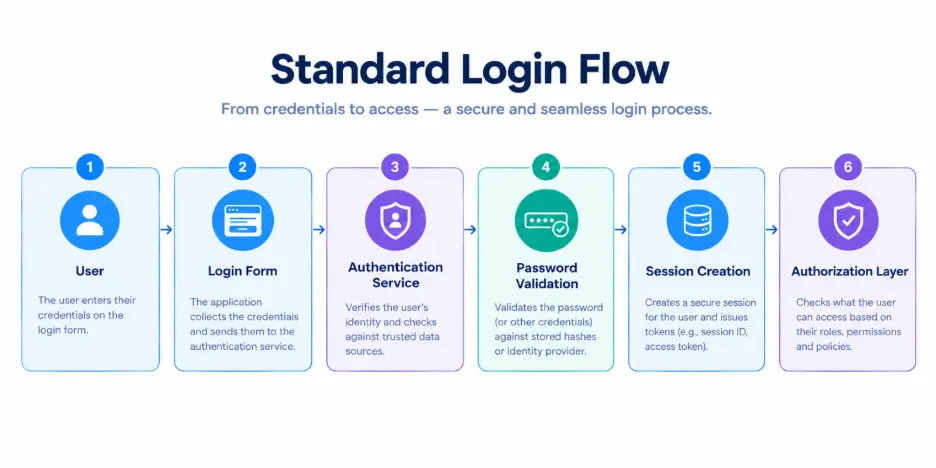
Customer Registration and Identifier Verification
The process usually starts when a customer creates an account using an identifier such as an email address, username, or phone number and sets a password. Depending on the application and its security requirements, the business may also verify an email address or phone number before activating the account or allowing certain actions.
Verification helps establish that the customer controls the identifier associated with the account. It can also support later workflows such as password reset, account recovery, and security notifications.
Secure Password Creation and Storage
Once a password is created, it needs to be handled securely. Passwords should be transmitted over an encrypted connection and should never be stored as plaintext. Instead, the authentication system should store a securely hashed representation using an appropriate password-hashing approach.
This matters because authentication does not require a business to retrieve and read a customer's original password. When the customer returns, the submitted password can be processed and checked against the securely stored password representation.
We'll cover what businesses should require—and avoid requiring—in their password policies later in this article.
Credential Submission and Authentication
When the customer signs in, they provide their registered identifier and password. The authentication system locates the corresponding account and validates the submitted credentials.
A successful credential check confirms that the customer has supplied the expected authentication secret. It does not automatically mean every request should be trusted without further checks. Risk signals, MFA, bot protection, rate controls, or step-up authentication may still be applied depending on the application and the sensitivity of the action.
Failed attempts also need careful handling. Responses should help legitimate customers recover without exposing unnecessary information that could help an attacker determine whether a particular account exists.
Session Creation and Application Access
After successful authentication, the application can establish an authenticated session so the customer does not have to re-enter credentials for every request. From there, authorization controls determine which resources and actions that customer is permitted to access.
Sessions need protection too. Appropriate expiration, logout behavior, secure cookie or token handling, reauthentication for sensitive actions, and session invalidation after relevant security events all contribute to the security of the overall login experience.
Password Reset and Account Recovery
Passwords will be forgotten, devices will change, and customers will occasionally lose access to their usual recovery method. Account recovery therefore needs to be treated as part of the authentication system—not as a weaker side door around it.
Password-reset and recovery flows should verify the request appropriately, use time-limited recovery mechanisms, avoid exposing account information, and invalidate or reconsider existing sessions when the situation warrants it. For higher-risk accounts or actions, additional verification may also be appropriate.
Here’s where teams can get caught out: a strong login flow offers limited protection if an attacker can bypass it through an easier recovery process. Standard login should therefore be evaluated as a complete lifecycle, from registration and authentication through recovery and session termination.
Why Businesses Still Use Standard Login for Customer Authentication
Standard login gives customers an authentication experience they already recognize: enter an identifier, provide a password, and access the account. That familiarity can make it a practical option for businesses serving broad customer populations, particularly when users may not want to depend on a social provider, specific device, or another external identity to sign in.
Its value, however, is not simply familiarity. Standard login also gives businesses more control over how customer credentials, registration, recovery, and authentication policies fit into the wider customer journey.
Give Customers a Familiar Sign-In Option
Email or username and password authentication requires little explanation for most customers. It can work across browsers and devices without requiring customers to have an account with a particular social identity provider.
Familiarity should not become an excuse for unnecessary friction, though. Long registration forms, confusing password requirements, repeated verification, and difficult recovery processes can make a familiar authentication method frustrating very quickly.
Maintain Control Over the Authentication Experience
With standard login, businesses can define how registration, identifier verification, password policies, authentication, recovery, and account management work for their applications.
That control is particularly useful when the authentication experience needs to reflect specific customer journeys. An ecommerce site, for example, may prioritize quick account access while applying stronger verification to sensitive profile or payment-related changes. A financial application may require additional authentication much earlier.
The login method can remain familiar while the security controls around it adapt to the risk.
Avoid Making a Third-Party Identity Provider the Only Login Path
Social login can reduce friction, but not every customer wants to use a Google, Apple, Facebook, or another third-party account to access a service. Standard login gives businesses a direct authentication option that does not make a supported social identity provider the customer's only route into the account.
Businesses can also offer both approaches. Standard login, social login, passkeys, and other authentication methods do not always have to be mutually exclusive choices.
Support Customer Account and Recovery Workflows
A standard login system can connect authentication with account verification, password reset, credential changes, recovery, security notifications, and other customer identity workflows.
Recovery deserves particular attention. Customers need a reliable way back into their accounts, but the recovery path should not become easier to abuse than the normal login process. The business therefore needs to consider account recovery as part of the same security design as authentication.
Add Stronger Authentication When the Risk Calls for It
A password does not need to be the final security check for every interaction. Businesses can combine standard login with MFA, contextual risk evaluation, bot protection, or step-up authentication when additional assurance is appropriate.
A customer might use their password for routine account access but face another verification step before changing a password, updating sensitive account information, or performing a high-risk transaction.
That flexibility is one reason standard login can still have a place in a broader authentication strategy. The important question is not simply whether a business supports passwords. It is whether the entire login experience is designed around the risks its customers and applications actually face.
How Businesses Should Design a Secure Standard Login Experience
A secure standard login should make legitimate access straightforward without making attacks easy. That balance depends on more than the password field. Businesses need to consider which identifier customers use, how accounts are verified, what information login responses reveal, and whether the entire authentication journey works consistently across devices.
Choose the Right Login Identifier for Your Customers
Email addresses are a common choice because they are familiar and can support verification, recovery, and security notifications. Usernames can be useful when customers need a public or persistent identifier that is separate from their email address. Phone numbers may make sense for mobile-first experiences, although number changes, reassignment, and recovery need to be considered.
Some applications support more than one identifier. Whatever approach you choose, define how identifiers are normalized, verified, changed, and kept unique where uniqueness is required. Small inconsistencies here can create duplicate accounts or confusing recovery experiences later.
Verify Customer Identifiers Where Appropriate
Verification helps establish that a customer controls the email address or phone number associated with an account. This can be important during registration, before sensitive account changes, and when an identifier will later be used for recovery.
The right timing depends on the application. Requiring verification before any access may be appropriate for some services, while others may allow limited access first and require verification before higher-risk actions.
Avoid collecting or verifying information simply because the login system supports it. Every extra requirement adds friction and creates more customer data for the business to manage.
Keep the Login Form Simple and Accessible
A secure login page does not need to feel difficult.
Use clearly labeled fields, make error messages understandable, support password managers and password pasting, and consider a password visibility control so customers can catch typing errors. Login and recovery should also work properly across supported browsers, mobile devices, keyboards, and assistive technologies.
Here’s where teams sometimes create problems themselves: security requirements become UI obstacles. Disabling password paste, adding unnecessary fields, or imposing complicated password rules can frustrate legitimate customers without addressing the attacks that matter most.
Avoid Revealing Unnecessary Account Information
Authentication responses can accidentally tell an attacker whether a particular email address or username is registered. Differences such as “Account does not exist” versus “Incorrect password” can make account enumeration easier.
For login and recovery flows where enumeration is a concern, businesses should use responses that do not unnecessarily disclose whether an account exists. At the same time, those messages still need to give legitimate customers enough direction to continue or recover access.
This is a UX and security trade-off. Generic should not mean confusing.
Treat Login, Recovery, and Credential Changes as One Security Surface
Protecting the login form while leaving password reset or account recovery weak creates an obvious gap. Registration, login, password reset, identifier changes, MFA enrollment, recovery, logout, and session management should be evaluated together.
Sensitive account changes may warrant recent authentication or an additional verification step. Recovery mechanisms should also be protected against automated abuse and should not rely on information that an attacker could easily discover.
Apply Security Controls According to Risk
Not every login attempt needs the same level of friction. Signals such as repeated failures, unusual behavior, automation indicators, or access to a sensitive action can inform whether additional controls are needed.
Depending on the situation, that might mean throttling attempts, challenging suspicious automation, requiring MFA, asking the customer to reauthenticate, or denying the request.
The goal is not to make every customer prove their identity repeatedly. A well-designed standard login keeps routine authentication straightforward while reserving stronger controls for situations where the risk justifies them.
Password Best Practices Businesses Should Follow for Standard Login
Password security is often reduced to one instruction: make passwords complicated. For businesses designing standard login, that is no longer enough. A good password policy needs to discourage weak and compromised credentials without creating rules that encourage predictable behavior or make password managers harder to use.
| Password Policy Decision | Recommendation |
|---|---|
| Password Length vs Complexity Rules | Instead of requiring a mixture of uppercase, lowercase and special characters, enforce a reasonable minimum length (typically 8 or more characters, with support for much longer passwords) as that helps users come up with passphrases that are easy to remember and harder to attack. |
| Compromised Passwords | Reject passwords that appear in breach databases or commonly used password lists, even if they satisfy length requirements. |
| Password Managers | Support password managers and allow autofill to help customers use unique credentials for every account. |
| Password Pasting | Allow password pasting. Blocking paste discourages password manager usage and does not meaningfully improve security. |
| Password Expiration | Avoid forcing routine password changes (anything under 90 days) unless compromise is suspected or confirmed. |
| Password Storage | Store passwords using salted password hashing, never plaintext or reversible encryption. |
| Password Changes | Require reauthentication or MFA before sensitive credential updates. |
A password policy cannot prevent every account takeover attempt. It can, however, avoid making weak credentials unnecessarily easy to create while giving customers the tools to manage stronger ones.
How Businesses Can Protect Standard Login Against Common Attacks
Even a well-designed password policy cannot control what happens to credentials outside your application. Customers reuse passwords, credentials appear in breach datasets, phishing can capture legitimate passwords, and automated tools can test large numbers of login combinations quickly.
That means businesses need controls around the login process itself. The goal is not simply to reject incorrect passwords. It is to recognize and limit authentication behavior that may indicate abuse.
Detect and Limit Credential Stuffing
Credential stuffing uses username-password combinations obtained from previous breaches to attempt access to accounts on other services. Password reuse makes these attacks particularly relevant to standard login.
Businesses can reduce the risk through compromised-password screening, rate controls, bot and automation detection, suspicious-login monitoring, and MFA or step-up authentication where appropriate. Controls should consider more than repeated failures from a single IP address because distributed attacks can spread attempts across many sources.
Slow Down Brute-Force and Password-Spraying Attempts
Brute-force attacks repeatedly try passwords against an account, while password spraying typically tests a small number of common passwords across many accounts. The patterns differ, so relying on a simple per-account attempt limit may not catch both effectively.
Login throttling, progressive delays, rate controls, monitoring, and contextual signals can help identify unusual authentication behavior. Account lockout can also be useful in some situations, but overly aggressive lockouts can create customer frustration or even be abused to deny legitimate users access.
The better approach is layered. No single threshold will identify every malicious attempt.
Reduce the Impact of Phished or Stolen Passwords
A customer can create a long, unique password and still disclose it to a convincing phishing site. Standard passwords are shared secrets, so possession of the correct credential may be enough to pass the first authentication check.
MFA can add another barrier when passwords are compromised. For applications that require stronger phishing resistance, businesses can also evaluate authentication methods such as passkeys based on FIDO/WebAuthn rather than assuming stronger password rules alone will solve phishing.
Prevent Account Enumeration Through Login and Recovery
Attackers often want to know whether an email address or username belongs to a valid account before attempting further attacks. Login, registration, and password-recovery responses can unintentionally reveal this information.
Where account enumeration is a concern, avoid unnecessarily different responses such as “This account does not exist” and “The password is incorrect.” Similar care is needed with response behavior and recovery workflows, since changing only the visible login message may not eliminate every enumeration signal.
There is a usability trade-off here. Businesses need to reduce unnecessary account disclosure without making legitimate recovery impossible to understand.
Protect Login Endpoints From Automated Abuse
Not every automated login request is a traditional brute-force attack. Bots can create accounts, test credentials, abuse recovery workflows, or generate large volumes of authentication traffic.
Bot detection, rate controls, behavioral and contextual signals, and challenges where appropriate can help separate suspicious automation from legitimate customers. CAPTCHA may be useful as one defensive layer, but it should not be treated as the entire bot-protection strategy.
Applying challenges selectively can also reduce unnecessary friction for normal customers.
Protect the Session After Authentication
Stopping attacks at the password check is only part of the job. Once a customer is authenticated, an attacker may target the resulting session rather than trying to obtain the password again.
Businesses should protect session cookies or tokens appropriately, enforce suitable expiration and logout behavior, and invalidate sessions when relevant security events occur. Sensitive actions may also justify recent authentication or an additional verification step even when the customer already has an active session.
Here’s where the distinction matters: successful login does not mean unlimited trust for the lifetime of the session. Authentication risk can change after the initial credential check.
A layered approach helps businesses match each threat with a more appropriate control:
| Standard Login Threat | Controls to Consider |
|---|---|
| Credential stuffing | Compromised-password screening, bot detection, rate controls, MFA, risk signals |
| Brute-force attacks | Throttling, progressive delays, monitoring, appropriate lockout controls |
| Password spraying | Weak-password prevention, cross-account detection, MFA, monitoring |
| Phishing or stolen credentials | MFA, step-up authentication, phishing-resistant methods where appropriate |
| Account enumeration | Generic responses and carefully designed recovery flows |
| Automated abuse | Bot detection, contextual signals, rate controls, selective challenges |
| Session theft | Secure session handling, expiration, reauthentication, session invalidation |
The important point is that password strength and login security are not the same thing. A secure standard login combines sensible credential requirements with protections for the attacks that happen before, during, and after authentication.
When Standard Login Should Be Strengthened With MFA or Step-Up Authentication
A password can verify one authentication factor, but some situations call for stronger assurance. Businesses can keep standard login as the primary sign-in method while requiring additional authentication when the account, action, or observed risk justifies it.
This does not mean every customer should face the same extra step on every login. Requiring additional authentication selectively can provide stronger protection without adding unnecessary friction to routine access.
Add MFA When a Password Alone Is Not Enough
Multi-factor authentication requires authentication from more than one independent factor category. For example, a customer may first enter a password and then verify possession of a registered authenticator or device.
MFA can be particularly valuable for accounts containing sensitive information, higher-risk customer journeys, or environments where stolen passwords could lead to significant harm. It also reduces reliance on the password as the only barrier protecting the account.
The strength of MFA depends on the methods used. Not every second step provides the same resistance to phishing or account takeover, so businesses should choose authentication methods according to their threat model and assurance requirements.
Use Step-Up Authentication for Sensitive Actions
A customer who has already signed in may still reach an action that warrants additional verification. Step-up authentication allows the application to request stronger or more recent authentication at that point rather than applying maximum friction to the entire session.
Common situations can include:
-
Changing a password, email address, phone number, or recovery method
-
Accessing particularly sensitive personal or financial information
-
Performing a high-risk payment or transaction
-
Enrolling or removing an authentication factor
-
Recovering an account
-
Performing privileged customer or partner actions
The exact triggers should reflect the application's risk model rather than a universal checklist.
Consider Context When Authentication Risk Changes
Risk does not always remain constant after the customer enters the correct password. A login from an unfamiliar environment, unusual authentication behavior, repeated failures, automation indicators, or another meaningful risk signal may justify additional verification.
In those cases, the application can respond according to policy—for example, allow normal access, request another authentication factor, require recent authentication for a sensitive action, or deny the attempt.
This is where standard login becomes more adaptable. The password can remain the familiar starting point while stronger controls are introduced when the situation warrants them.
Businesses should avoid treating MFA or step-up authentication as a way to compensate for weak password handling, insecure recovery, or poor session security. These controls work best as additional layers within a well-designed authentication system, not as substitutes for fixing weaknesses elsewhere.
Standard Login vs Passwordless, Passkeys, Social Login, and SSO
Standard login is one way to authenticate customers, but it does not need to be the only option a business provides. Passwordless authentication, passkeys, social login, and SSO can address different customer needs, security requirements, and application architectures.
The important distinction is what each approach changes. Some remove the password, some rely on an external identity provider, and SSO primarily changes how often a customer needs to authenticate across connected applications.
| Authentication Approach | Typical Customer Experience | Password Required? | What Businesses Should Consider |
|---|---|---|---|
| Standard Login | Customer enters an email, username, or other identifier with a password | Yes | Familiar experience, but requires secure password, recovery, and attack-protection controls |
| Passwordless Authentication | Customer authenticates without entering a password, depending on the method used | No | Method security, recovery, device access, and customer experience |
| Passkeys | Customer authenticates using a device-supported FIDO/WebAuthn credential | No | Phishing resistance, device/platform support, enrollment, and recovery |
| Social Login | Customer authenticates through a supported external identity provider | Usually not with the application | Provider dependency, account linking, customer choice, and identity handling |
| SSO | One authentication can provide access across multiple connected applications | Depends on the underlying authentication method | Federation architecture, session behavior, application trust, and logout requirements |
Should Businesses Replace Standard Login?
There is no single authentication mix that fits every customer journey. A consumer application serving a broad audience may have different requirements from a financial service handling high-risk transactions or a B2B platform providing access across several applications.
Some businesses may retain standard login while adding MFA. Others may introduce social login, passwordless options, or passkeys alongside it and gradually reduce password dependence where that makes sense.
The better question is whether each authentication method matches the customer, risk, application, and recovery requirements it needs to support. Standard login can remain one part of that strategy without having to be the only way customers authenticate.
How Standard Login Best Practices Change Across Industries
The fundamentals of secure standard login remain consistent, but the level of assurance and friction a business can reasonably introduce varies by industry. A retail customer checking an order and a banking customer changing payment information do not necessarily need the same authentication experience.
Rather than applying identical controls everywhere, businesses should consider the sensitivity of customer data, consequences of account takeover, regulatory obligations, transaction risk, and how frequently customers need to authenticate.
| Industry | Best Practice |
|---|---|
| Retail and eCommerce | Simpler login flows with stronger controls applied around higher-risk events such as password changes, loyalty-point redemptions, or transactions. Must protect against breached passwords, credential stuffing. |
| Banking and Financial Services | Combine standard login with MFA, risk-based authentication, stronger session controls, transaction verification, and step-up authentication. Monitor authentication activity for signs of credential abuse or account takeover and align controls with regulatory and risk requirements. |
| Healthcare | Prioritize protection of sensitive personal and health information through MFA, secure account recovery, protection against automated attacks, session security, and reauthentication for sensitive account updates. |
| Media and Subscription Services | Optimize repeat access across web, mobile, smart TVs, and connected devices. Focus on session management, account recovery, credential-sharing controls, account takeover protection, and automated abuse detection without introducing friction across every login event. |
| Travel and Hospitality | Support customers who routinely sign in from new devices and locations. Use contextual risk signals carefully, applying additional verification when sensitive changes or unusual activity occur. Ensure account recovery works reliably for travelers who may not have access to their usual device. |
| Government and Citizen Services | Design for accessibility, secure recovery, and appropriate levels of authentication assurance based on the sensitivity of the service. Higher-risk activities such as accessing personal records or performing official transactions may require stronger verification than viewing general information. |
Standard Login Implementation Checklist for Businesses
Before launching or updating standard login, businesses should test the complete authentication journey rather than reviewing the login page in isolation. Registration, credential handling, recovery, sessions, and higher-risk actions all affect whether the experience remains secure after deployment.
Use this checklist as a practical review:
-
Choose the right login identifier: Decide whether customers should authenticate with an email address, username, phone number, or supported combination based on the account model and customer journey.
-
Verify identifiers where appropriate: Confirm control of email addresses or phone numbers when the risk or workflow requires it.
-
Set a modern password policy: Prioritize sufficient length, avoid unnecessary composition rules, and allow customers to use password managers.
-
Block common and compromised passwords: Do not accept weak credentials simply because they satisfy formatting requirements.
-
Protect credentials in transit and storage: Use encrypted connections and appropriate salted password hashing rather than storing plaintext or reversibly protected passwords.
-
Protect against automated attacks: Apply suitable throttling, rate controls, bot detection, monitoring, and other defenses against credential stuffing and brute-force activity.
-
Avoid unnecessary account disclosure: Design login and recovery responses to limit account enumeration without making legitimate recovery confusing.
-
Strengthen authentication when risk increases: Use MFA, reauthentication, or step-up authentication for sensitive actions and higher-risk situations where appropriate.
-
Secure password reset and account recovery: Treat recovery as part of the authentication boundary rather than a weaker alternative to normal login.
-
Protect authenticated sessions: Define appropriate expiration, logout, token or cookie handling, session invalidation, and reauthentication behavior.
-
Monitor authentication activity: Capture useful security events so suspicious login, recovery, and credential-change patterns can be investigated.
-
Test the complete customer journey: Validate registration, verification, login, failed authentication, password changes, recovery, MFA, session expiration, logout, and supported devices before deployment.
The final test should be simple: can a legitimate customer get into and recover their account without unnecessary friction, while suspicious activity encounters progressively stronger controls?
A secure standard login should achieve both. Adding more authentication steps everywhere is not automatically safer; applying the right controls at the right points is what makes the overall experience stronger.
How LoginRadius Helps Businesses Build Secure Standard Login Experiences
Building standard login internally means maintaining more than registration and credential validation. Teams also have to account for verification, password management, recovery, authentication security, sessions, customer profile changes, and the APIs and integrations that connect identity to the rest of the application.
LoginRadius provides a developer-centric CIAM platform for managing customer authentication and identity across these workflows. Businesses can support standard login using identifiers such as email, username, or phone, depending on their authentication configuration, while controlling how registration and verification fit into the customer journey.
Instead of treating password authentication as an isolated login form, teams can connect it with broader customer identity capabilities such as password management, MFA, risk-based authentication, bot and brute-force protection, breached-password protection, session management, and account recovery. This makes it easier to apply stronger controls when the risk warrants them without forcing the same authentication experience on every customer interaction.
Businesses also do not have to make standard login their only authentication option. LoginRadius can support standard login alongside passwordless authentication, passkeys, social login, and SSO, allowing teams to offer different authentication experiences as customer and application requirements evolve.
For developers, APIs and SDKs help integrate authentication into existing applications without rebuilding the underlying identity infrastructure for every product or channel. Businesses can also manage customer profiles and authentication policies centrally as their identity requirements grow.
The result is a more flexible approach: keep standard login where it makes sense, strengthen it with additional controls where needed, and introduce other authentication methods without maintaining disconnected identity systems for each experience.
Conclusion: Build a Standard Login Experience That Balances Security and Customer Experience
Standard login may look simple to customers, but the experience behind those familiar identifier and password fields requires careful design. Password policy, credential protection, account recovery, attack prevention, session security, and stronger authentication for higher-risk situations all influence how well it protects customer accounts.
The goal is not to add more friction everywhere. Businesses need to make routine authentication straightforward while applying stronger controls when the customer, action, or risk calls for them. And as authentication strategies evolve, standard login can coexist with MFA, passkeys, passwordless authentication, social login, and SSO rather than operating as an isolated system.
LoginRadius helps businesses manage these customer authentication experiences through a developer-centric CIAM platform built for secure, scalable customer identity. Keep the authentication methods that work for your customers, strengthen them where needed, and give your teams the flexibility to evolve without rebuilding identity infrastructure for every application.
Ready to improve your customer login experience? Book a demo with LoginRadius and see how you can build secure authentication around your customers and business requirements.
FAQs
Q: What is standard login?
A: Standard login is a credential-based authentication method where a customer signs in using an identifier, such as an email address or username, and a password. The credentials are validated before an authenticated session is created.
Q: How does standard login work?
A: A customer submits their registered identifier and password over a secure connection. The authentication system validates the credentials against the securely stored password representation and, if successful, creates an authenticated session.
Q: Is standard login secure?
A: Standard login can be secure when supported by strong password handling, secure recovery, attack protection, session security, and monitoring. For higher-risk accounts or actions, businesses should consider MFA or step-up authentication.
Q: What is the difference between standard login and passwordless login?
A: Standard login typically requires an identifier and password, while passwordless authentication removes the password from the sign-in process. Passwordless methods can include passkeys, magic links, OTPs, and other supported approaches.
Q: What is the difference between standard login and SSO?
A: Standard login describes authentication using local credentials such as an email and password. SSO allows one authentication to be recognized across multiple connected applications, reducing repeated sign-ins.
Q: What password policy should businesses use for standard login?
A: Businesses should prioritize sufficient password length, block common and compromised passwords, support password managers, and avoid unnecessary composition rules. Password changes should generally be required when compromise is suspected or confirmed rather than on an arbitrary schedule.
Q: Should standard login use MFA?
A: MFA is valuable when a password alone does not provide sufficient assurance, particularly for sensitive accounts, risky logins, or consequential actions. Businesses can apply MFA broadly or use step-up authentication according to risk.
Q: How can businesses protect standard login from credential stuffing?
A: Use layered controls such as compromised-password screening, rate controls, bot detection, suspicious-login monitoring, and MFA where appropriate. Businesses should also monitor attack patterns across accounts rather than relying only on per-account limits.